Surfer SEO Alternatives: How I Would Decide (And What Each One Costs)
Quick Context: I’ve used Surfer SEO for about a month, on one page of my B2B site. Lately I’ve been asking whether it’s actually the right fit for what I do — so this is not another tool review. It’s how I would choose between Surfer SEO alternatives: price first, then capability. To be honest about my experience, I have only used two of these tools myself (Surfer and Frase), and my detailed Frase review lives on this blog. Everything else in this post is a category, not a recommendation.
Some links in this post are affiliate links. If you subscribe, I may earn a commission at no extra cost to you.
When It’s Actually Worth Switching (And When It Isn’t)
Five things that would push me to look at Surfer SEO alternatives:
- I hit the documents or pages limit, and the next tier up isn’t worth the price jump.
- The capability I need sits on a tier I can’t justify. Worth saying plainly: Surfer does offer a content audit, team seats and AI-visibility tracking — but they come with higher tiers or a separate product, and that is where the price passes what I’m willing to pay.
- The score is hard to act on. A single number tells me the page could be better. A breakdown tells me what to fix.
- My site isn’t one page. The moment I’m optimizing twenty pages instead of one, the unit economics change.
- SEO is ongoing work, so a plan that looks cheap in month one looks different in month six. If I’m paying for functions I never open, I’m subsidizing features I don’t use.
And one reminder in the other direction: if you are in the middle of an experiment, do not switch tools. You will destroy your own comparison. I learned that the hard way, and it is the main reason my one-month follow-up numbers are hard to attribute.
What Surfer SEO Actually Costs (Plan by Plan)
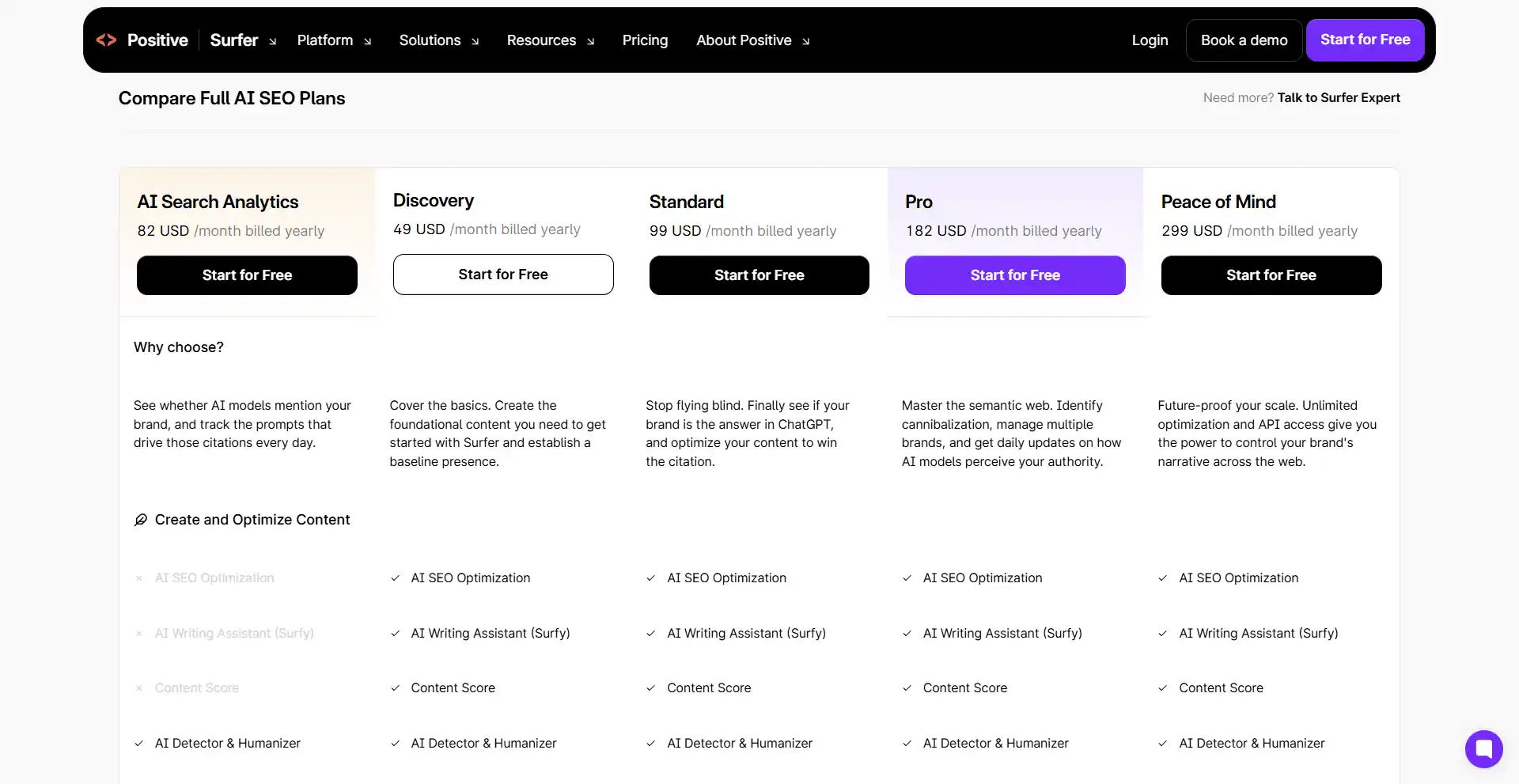
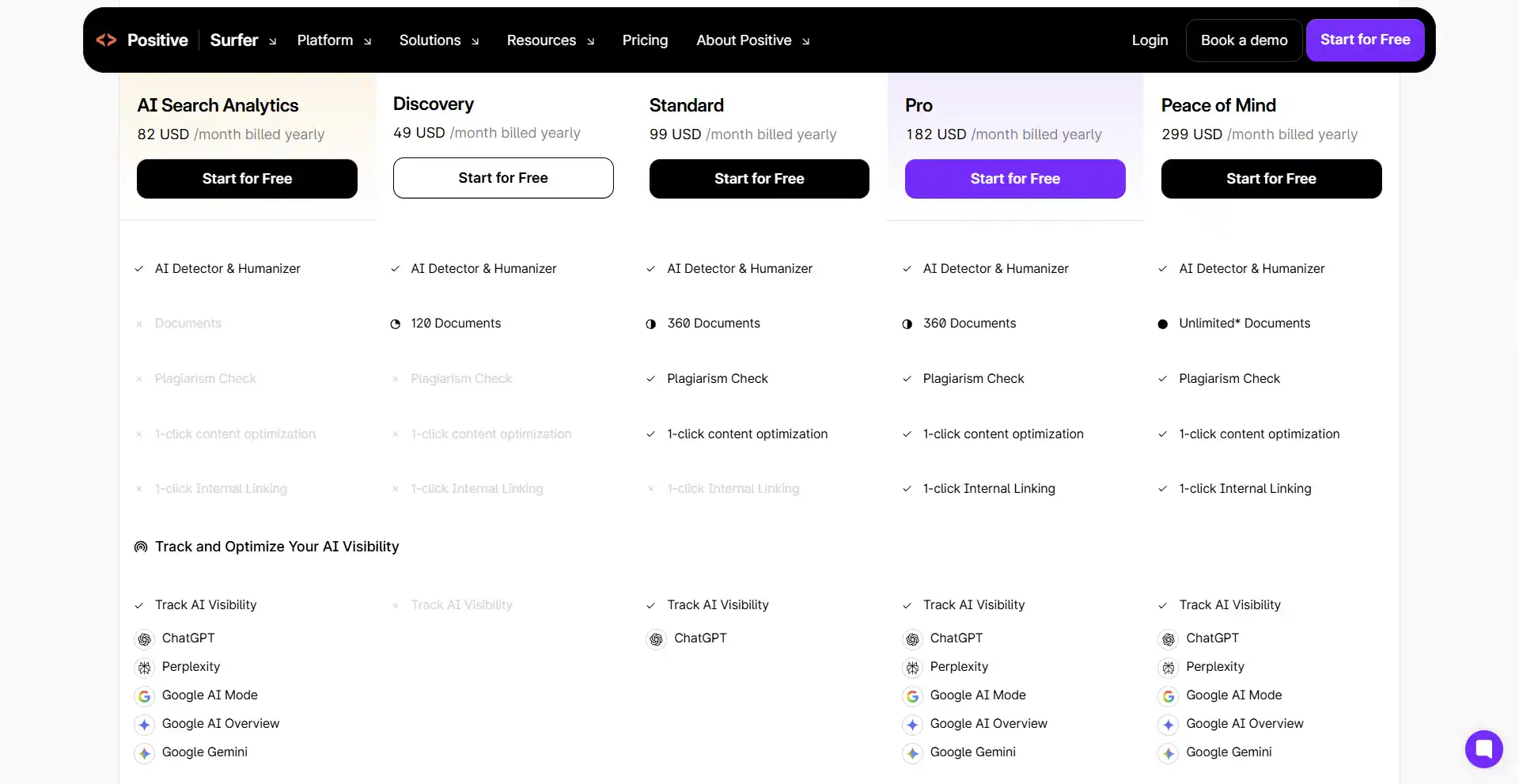
Surfer doesn’t sell one product at one price. It sells five plans, and the differences between them are mostly volume, not features. Here is what each tier costs and what actually changes as you move up. All prices below are the billed-yearly rate, captured in October 2026 — paying month to month costs more.
| Plan | Price / month (billed yearly) | You save | Documents | Pages tracked | Team seats |
|---|---|---|---|---|---|
| Discovery | $49 | $120 | 120 | 10 | 5 |
| Standard | $99 | $240 | 360 | 50 | 1 |
| Pro | $182 | $444 | 360 | 200 | 3 |
| Peace of Mind | $299 | $720 | Unlimited* | 500 | 5 |
| Enterprise | Custom | — | Custom | Custom | 10 |
What actually changes between tiers
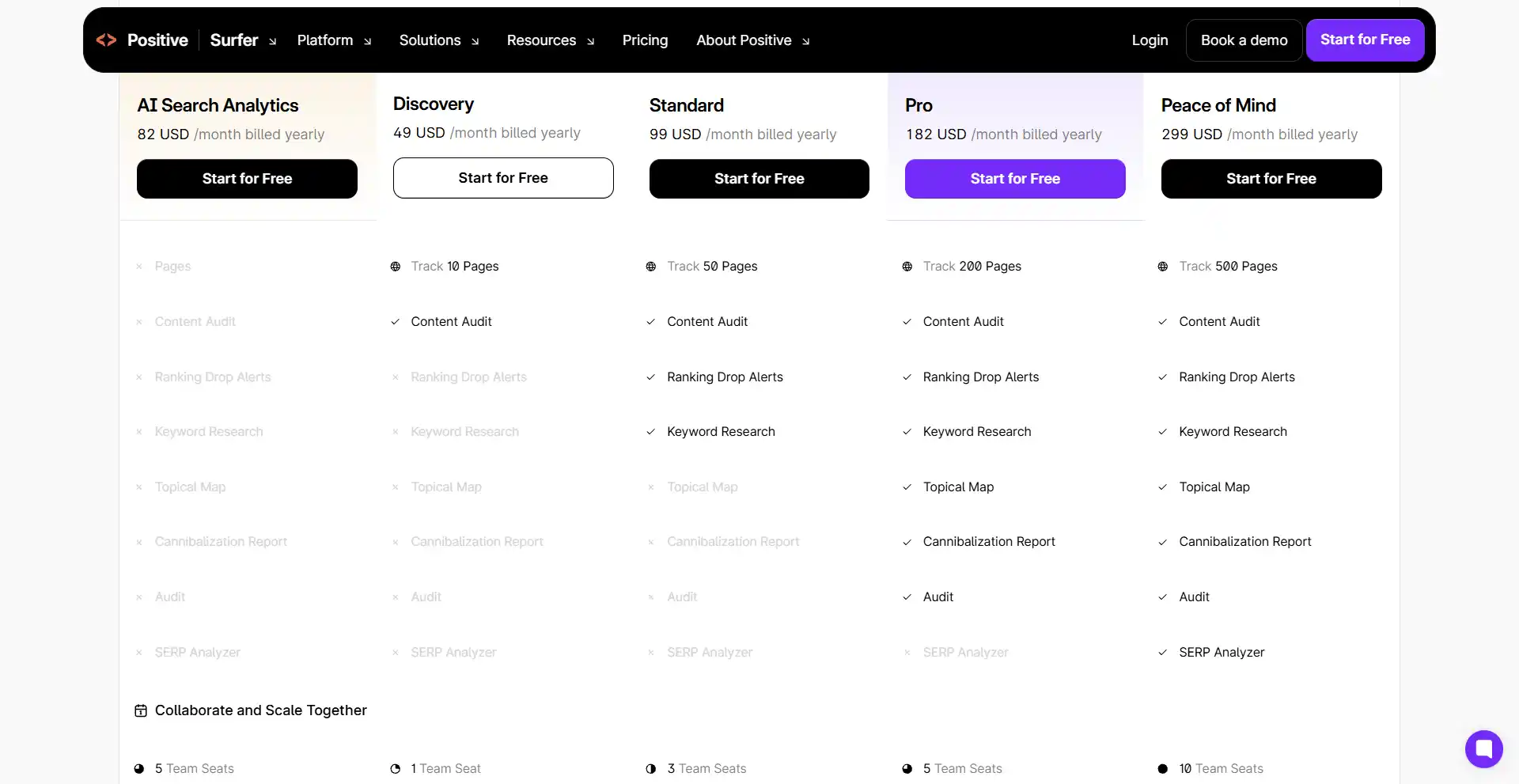
Documents go 120 → 360 → 360 → unlimited. Pages tracked go 10 → 50 → 200 → 500. The ladder isn’t linear: documents stall at 360 across two tiers while page tracking keeps climbing. In other words, the mid-tiers buy you tracking breadth, not more writing room.
Three things to check before you buy
1. Yearly billing is a commitment, not just a discount. The yearly rate is roughly 17% cheaper, and the “save $X” badge is doing the selling. If you are not certain you will still be using it in six months, that discount is a bet.
2. “Unlimited*” has an asterisk. The top tier advertises unlimited documents with fine print attached. Read the fine print before you assume there is no ceiling.
3. Seats don’t scale with price. Discovery lists 5 team seats, Standard lists 1, and Pro lists 3. If you work with other people, the cheapest tier may give you more seats than a mid-tier. Treat seats as their own line item instead of assuming a higher tier includes more of everything.
What I can and can’t tell you
I’ve used Surfer for about a month, on one page, so I’m not going to pretend I know which tier fits a five-person content team. What I can tell you is the arithmetic: what you pay for at each step is volume. And volume is exactly where the comparison with other tools gets confusing — which is the next section.
Cheaper Per Month Doesn’t Mean Cheaper Per Article
Surfer prices by documents: 120 → 360 → 360 → unlimited. Frase prices by articles: 10 → 40 → 100. Put the entry plans side by side and the arithmetic flips the story:
- Frase Starter: $39 ÷ 10 articles = $3.90 per article
- Surfer Discovery: $49 ÷ 120 documents ≈ $0.41 per document
That is roughly a nine-fold difference in unit cost — even though the two monthly prices are only $10 apart.
The caveat matters, though: the two units are not identical, and I’m not going to pretend they are. A document in Surfer is not defined the same way as an article in Frase, and the two tools do not do identical work per unit. What I am comparing is the count each pricing page gives you for the price it quotes — which is the only public basis anyone has for comparing them.
Both pricing pages are public, if you want the current numbers: Surfer’s plans and Frase’s plans.
There is a second trap in the same place: Frase counts audit pages, while Surfer counts pages tracked. Those are different meters doing different jobs. Do not compare them as if they were the same number.
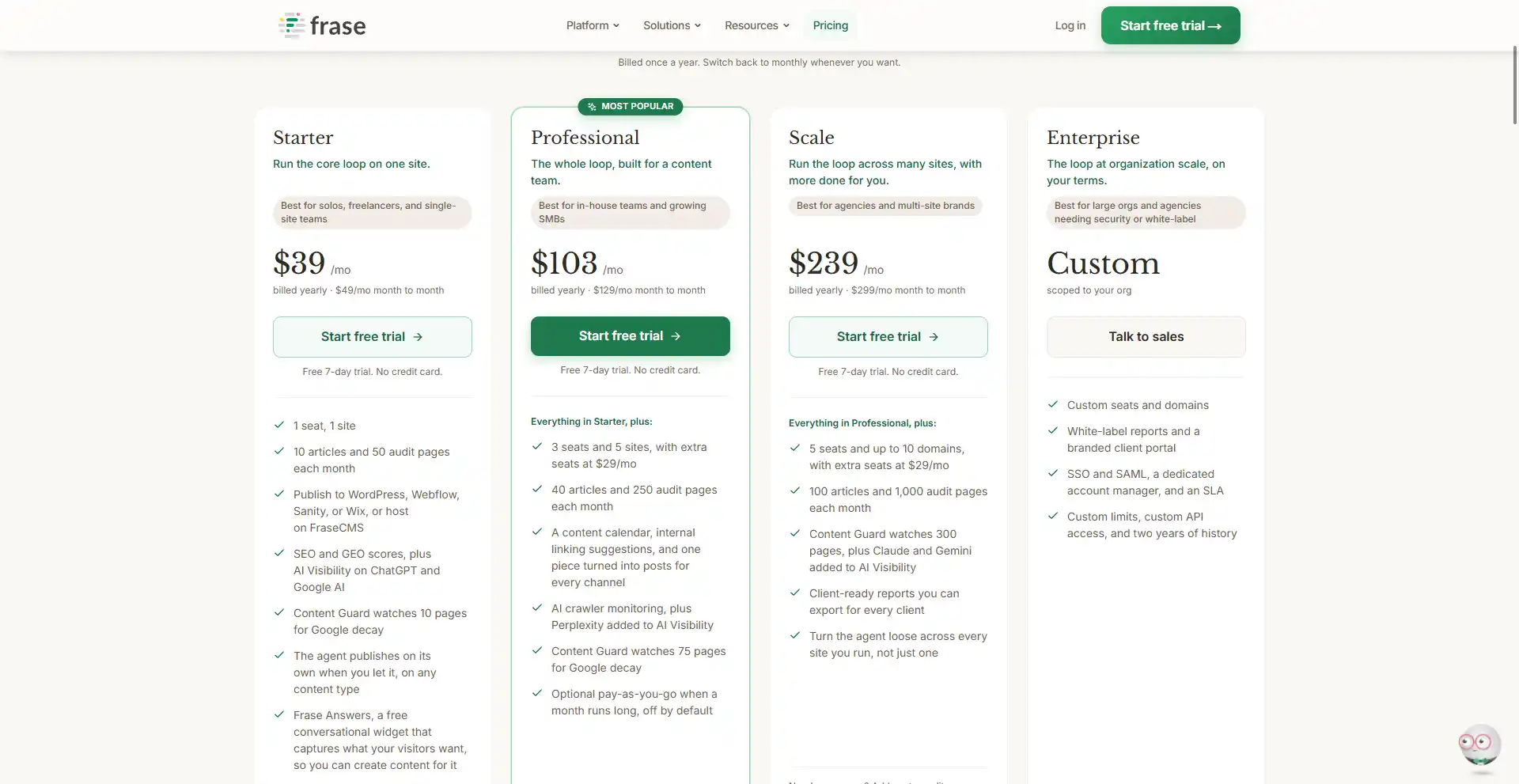
Conclusion: cheaper per month doesn’t mean cheaper per article. Before you pick a plan, work out how many pieces you will actually publish in a month, then divide.
The Surfer SEO Alternatives, by Category (I’ve Only Tested Two)
Rather than rank products I have not used, here is how Surfer SEO alternatives actually divide up:
- All-in-one SEO platforms — rank tracking, audits and content in one subscription.
- Content optimizers — SERP-driven scores and suggestions for a specific page.
- AI writing tools — drafting and editing, usually with no SEO scoring behind them.
- Site-audit specialists — technical and on-page checks across a whole site.
- Doing it yourself — your Google Search Console data plus a hand-written outline. Free, slow, and more capable than people admit.
Disclosure, so you can weigh everything above: I have only used Surfer and Frase. Everything else here is a category, not a recommendation.
How I’d Decide
Which Surfer SEO alternative is right depends on your situation:
- One page, tight budget — Surfer’s entry tier is probably enough.
- Many pages or several sites, with a team — the mid and higher tiers of either tool start to make sense, because that is where seats and tracking volume live.
- You want to know how you show up in AI answers — both companies now sell a product for that, so compare those specifically.
- You want to know why a page is weak, not just that it is — a score breakdown is more useful than a single number.
- You’re new to SEO — use the free trials before you pay for anything.
On the two tools I have actually used: Frase suits site-level auditing and teams better, and Surfer suits single-page optimization better. That is a one-line summary of a longer comparison — the specifics are in my Frase review.
Before You Switch: 5 Things to Check
- Export your Google Search Console data first, and write down a baseline — ideally two equal-length windows, not a rolling one.
- Do not change tools in the middle of an experiment. It ruins the comparison.
- Keep a change log: date, what you changed, why. This is the lesson from my own bad experience, and it is the reason I could not attribute my last results to either tool.
- Confirm what data you would lose with the old account before you cancel.
- Give the new tool a real observation window — at least a month — and check whether you are locked into yearly billing before you commit.
If you want the longer versions of both experiments: my Surfer SEO review covers the first one, and my Frase review covers the tool comparison on the same page.
Conclusion
Choosing between Surfer SEO alternatives comes down to matching limits and capabilities to what you actually do. It does not mean your positions will go up; if anything, my own data is a reminder of how hard that is to prove. What I would do is pick the plan whose limits fit your publishing volume, then give it a fair observation window before deciding again.
Frequently Asked Questions
Is there a free alternative to Surfer SEO?
Google Search Console is free and gives you the data that matters most: impressions, clicks, average position, and which queries you show up for. What no free tool does well is score a specific page against the current SERP. The closest free path is Search Console plus a hand-written outline — slower, but not worse.
Can I use two SEO tools at the same time?
Yes, and I would. They are better at different jobs: one for page-level optimization, another for site-level auditing. The thing to avoid is running both on the same page in the same window and then trying to work out which one helped.
Will switching SEO tools hurt my rankings?
No. Tools do not rank pages — content and links do. What can hurt you is switching mid-experiment and losing your ability to compare before and after.
What should I check before cancelling Surfer SEO?
Before you move to a Surfer SEO alternative: export your Search Console baseline, note anything stored in the account you would lose, confirm your billing term so you are not paying twice for a month, and make sure whoever runs the change log still has one.
Is Frase cheaper than Surfer SEO?
At the entry level, yes — $39 per month against $49. You can check both current price lists here: Frase and Surfer. Per unit of output it reverses: about $3.90 per article against roughly $0.41 per document. It depends entirely on what you count, which is the point of the section above.
How do I compare two tools that use different plan limits?
Convert both to cost per unit of the thing you actually produce — published pieces per month — and compare those numbers. Ignore the headline monthly price, because the limits behind it are rarely equivalent.