My robots.txt Said Welcome. My CDN Said 403: How I Audited My Website With an AI Agent
Quick Context: I run a small B2B PVC film export site, and I’ve been writing up what actually happened after I put two of its pages through Surfer SEO — including the things that did not move. This post is the next step in that investigation. Instead of optimizing one page at a time, I audited all 37 URLs from the outside with an AI agent: the method, the tools it took, and the raw numbers it turned up — including a blocking rule that had been invisible for months.
That contradiction in the headline was the single most valuable finding from a full audit
of my B2B website — and no SEO plugin, no crawler and no rank tracker could have surfaced
it. The block had been configured at the CDN edge months earlier and had been invisible
ever since.
Over the past few days I have been using DeepSeek V4.1 Flash and the Pi agent to audit
the site. Here is how to do a website audit yourself — the tools, the tests, and the
things that were hiding in plain sight.
Step 1: Check Google Search Console
Start by checking how your site performs in Google Search Console. The data shows total
clicks, impressions, average position and click-through rate — in other words, how your
website actually appears in Google.
| Metric | Baseline value | Source report |
|---|---|---|
| Total clicks | 14 | Search performance |
| Total impressions | 1,235 | Search performance |
| Average CTR | 1.1% | Search performance |
| Average position | 10.1 | Search performance |
| Generative AI impressions | 209 | Generative AI (Beta) |
The last row is the newest of the set. Google’s Generative AI report measures a different
search surface from the rest of Search Console, and it behaves nothing like traditional
search — I went through what those AI impressions actually
mean separately.
That is the basics. Next you need to look at two more reports:
Page Indexing and Data Insights.
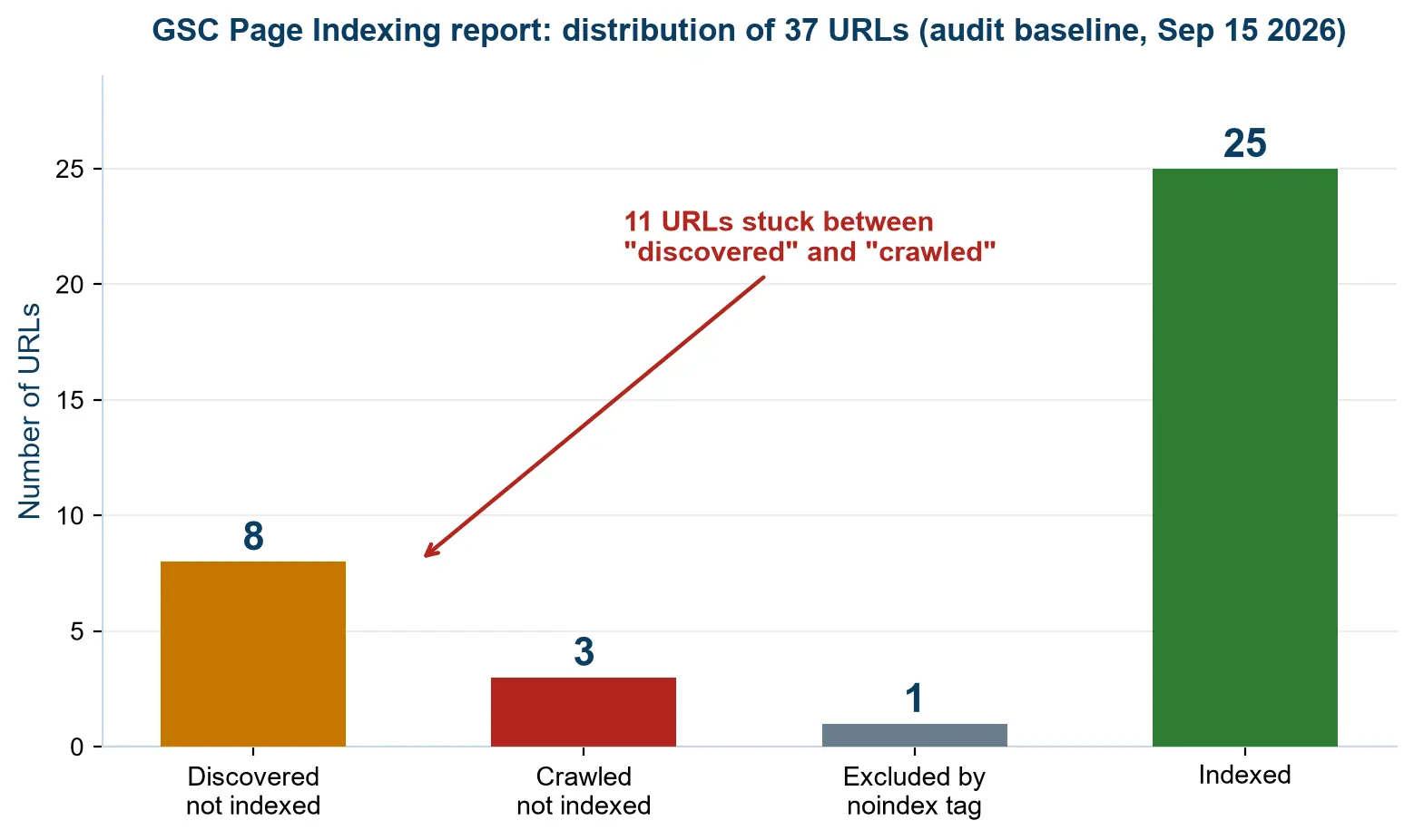
“Discovered — not indexed” means Google knows the URL but has not crawled it yet (a
crawl-priority problem). “Crawled — not indexed” means Google read the page and decided
it was not worth indexing (a content problem). The two require opposite fixes.
Why Page Indexing Matters
Why is page indexing so important? Because:
- It determines whether your website can be found at all
- Indexing is the precondition for gaining any search traffic
- It helps the search engine understand your content
- It directly affects business visibility and conversions
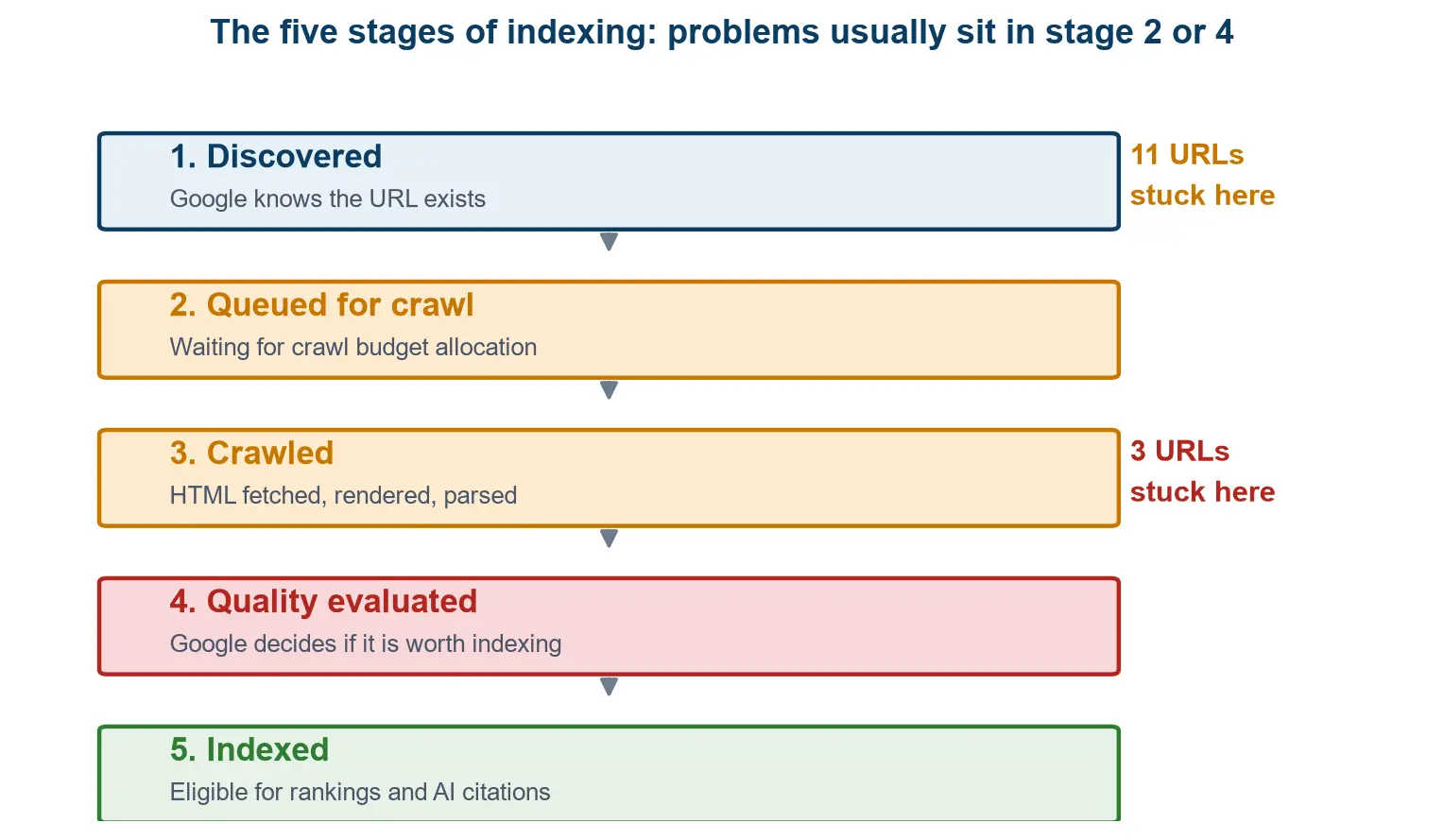
indexed are usually stuck at stage 2 (waiting for crawl budget) or stage 4 (failing the
quality check).
And Data Insights shows you which posts or pages are already performing well — and which
ones are quietly stagnating.
Step 2: Build Your Audit Toolkit
Before I reach for any tool, I run through
my AI SEO checklist first — eight checks, ten minutes, and it
stops me from optimizing a page that has a more basic problem. After that, here are the
plugins and tools you should install on your site — or use to crawl it — to get a full
picture of it.
1. Query Monitor
This is a WordPress plugin. My site is built with Elementor and runs a lot of plugins, and
Query Monitor shows what all of them are actually doing under the hood — the database
queries each one runs, and the scripts and styles each one enqueues.
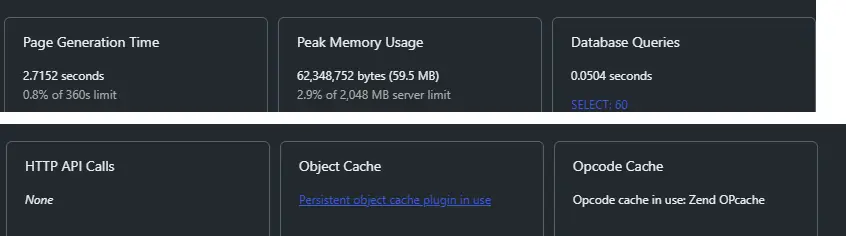
WordPress admin of the site being audited. Six numbers, and every one of them is something
a crawler can never tell you: how long the page took to generate, how much memory it
needed, how many database queries it ran and what type they were, and whether object
caching and opcode caching are actually working. (Captured while logged in, which is why
the totals run higher than a real visitor sees — the admin bar adds its own queries and
assets. Always measure performance logged out.)
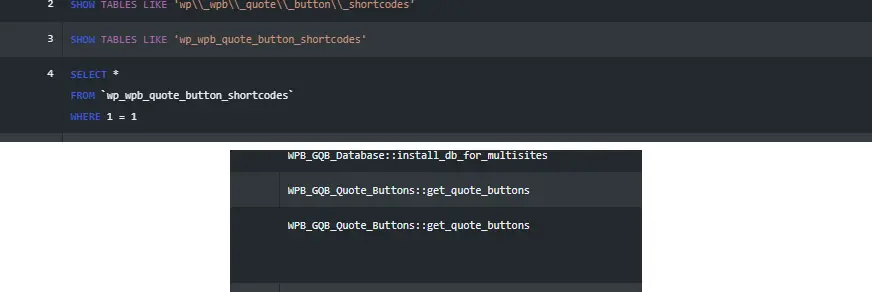
readable: the query list above, and below it the Caller column that names the code
responsible. Rows 2 to 4 are the answer to a question that should never be asked on every
page load — a plugin running
SHOW TABLES LIKE to check whether its own tablesexist, then
SELECTing from them. That is how you turn “the site feels slow”into “this plugin, on this hook, at this cost”.
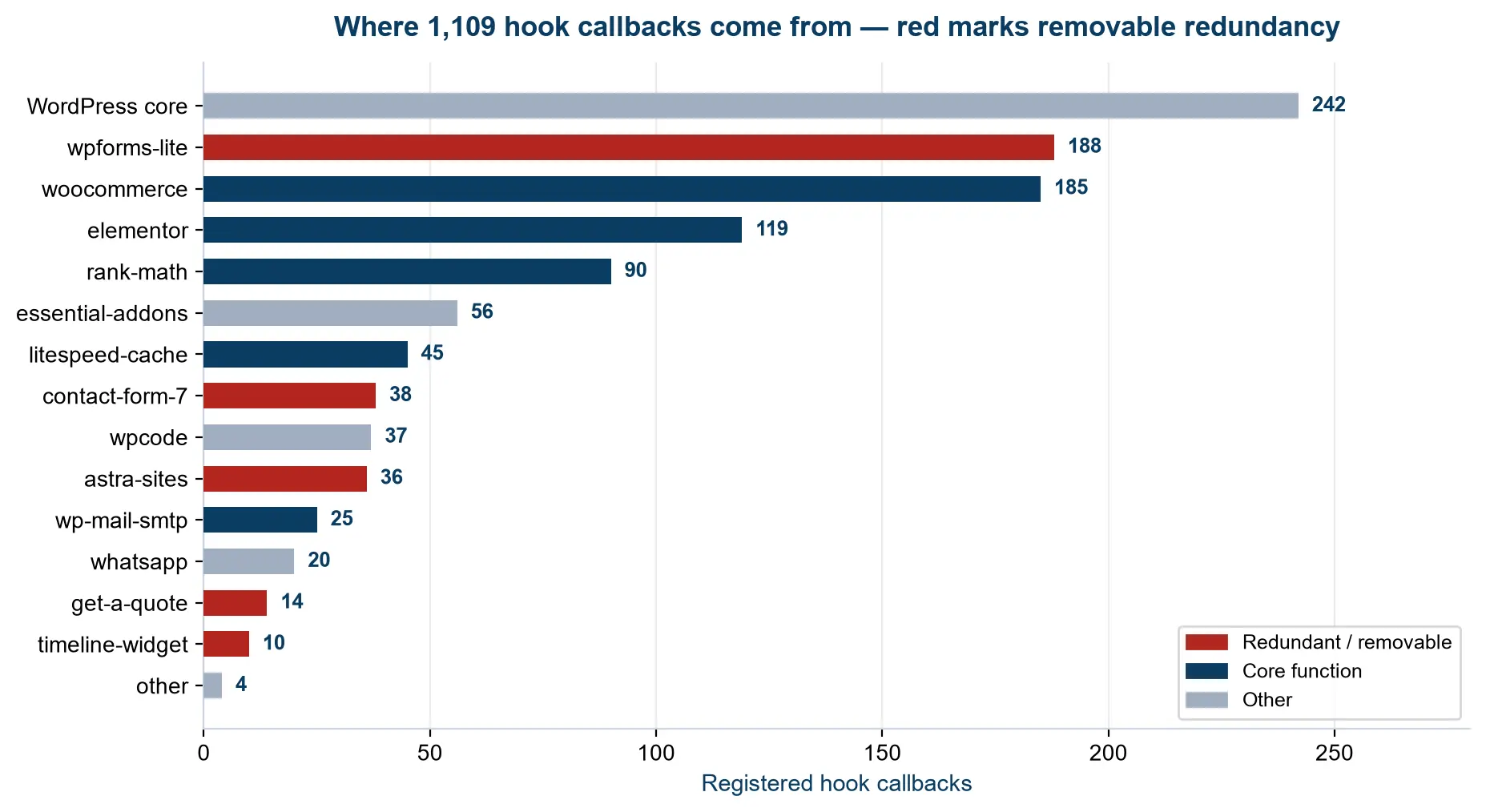
1,109 hook callbacks registered by 15 plugins. Highlighted in red are plugins I could
safely remove — including two overlapping form plugins and an Astra template-library
plugin still running on a site that uses the Kadence theme.
2. A Coding Agent
A coding agent does not only give you answers — it can also run scripts. Query Monitor only
shows you what is already happening inside WordPress. It cannot answer the questions that
matter most:
- Does GPTBot get a 403 while Googlebot gets a 200 on the same URL?
- How much of my content survives when JavaScript is disabled?
- Are two of my product pages near-duplicates of each other?
None of those questions can be answered by installing something. They have to be measured
from the outside. So the second thing you need is not a plugin — it is an agent that can
write and execute scripts.
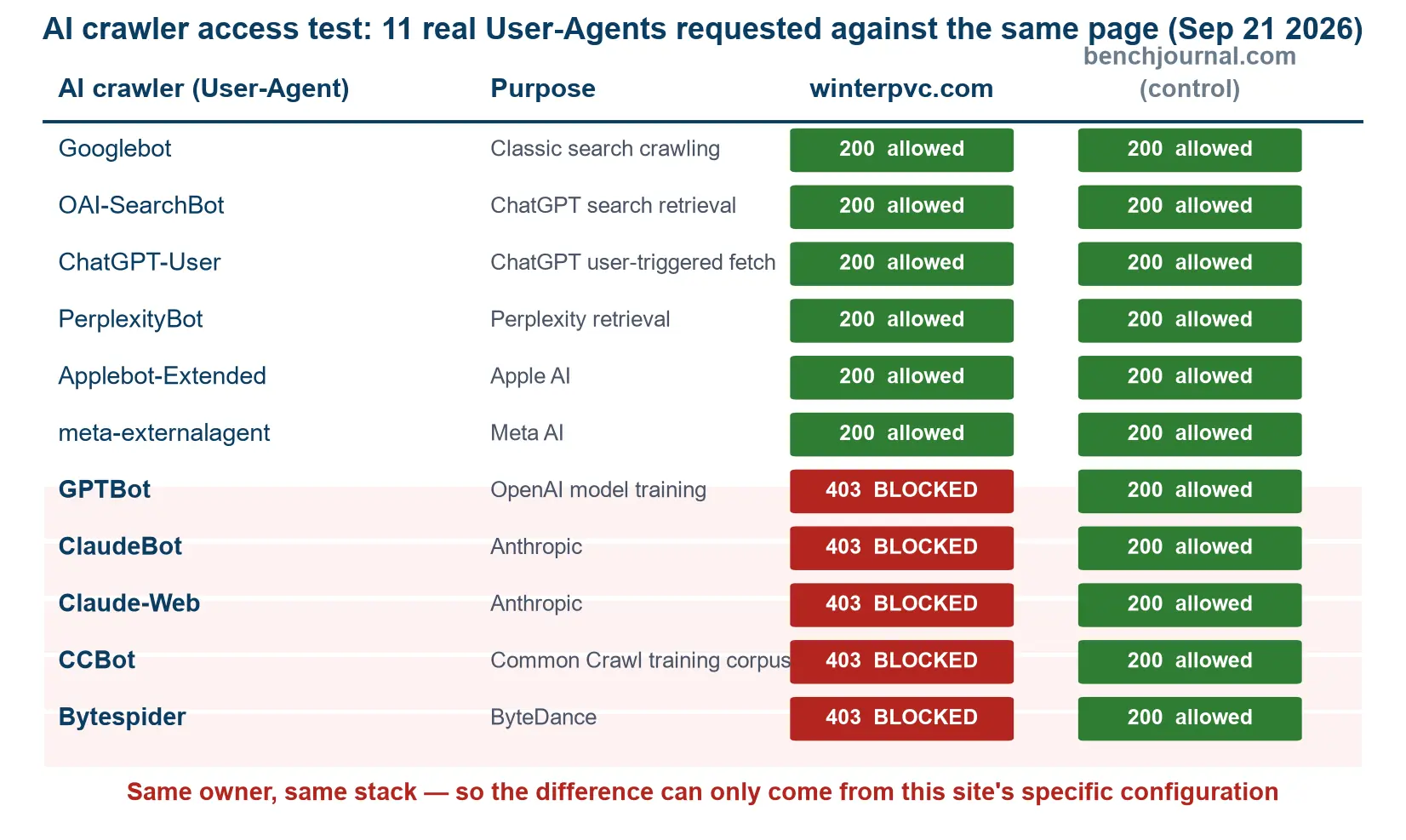
crawler User-Agents were sent to the same page. Five received HTTP 403 while the control
site (same owner, same WordPress stack) passed all eleven. The block was configured at the
CDN edge — nothing inside WordPress could have revealed it.
3. Other Tools You May Need
- Playwright: AI crawlers cannot render JavaScript, so this is the only
way to prove what they actually see. - Google Search Console: Google’s own judgement on your site. Everything
you need is in there. - Your CDN or hosting dashboard: my biggest problem was hiding here — a
rule that returned HTTP 403 to GPTBot and ClaudeBot while robots.txt said “Allow”. No
plugin and no crawler can see that, because the block happens before WordPress is ever
reached.
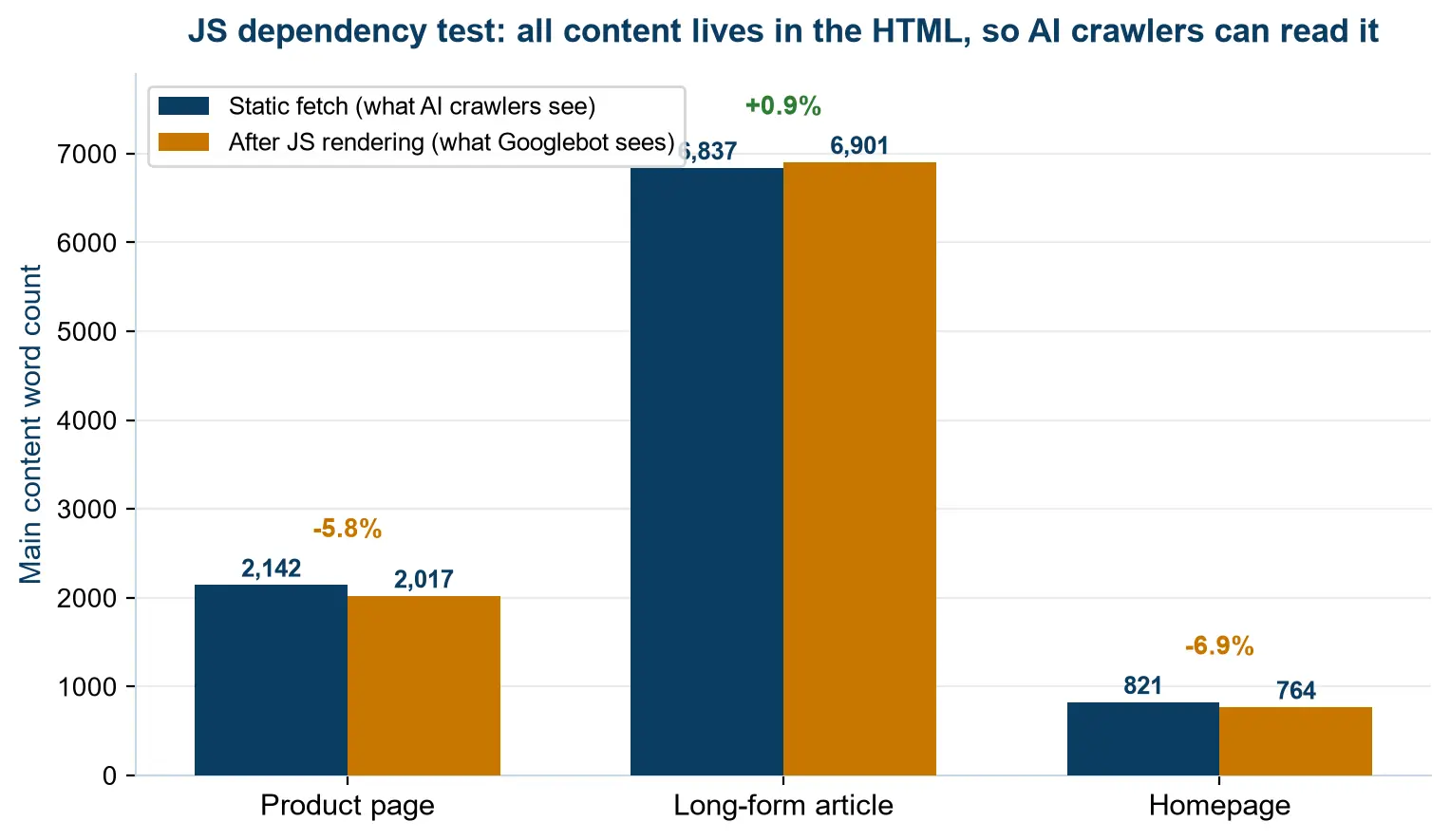
fetched twice — once statically and once after rendering. A difference under 7% proves the
content lives in the HTML, where AI crawlers can read it.
Step 3: Run the Audit
You now have data collected from various tools. The next step is to create a folder to store
it, and rename the files so you can tell which is which. I created a folder called
“query monitor”, and the agent’s output goes into “deep audit”. Inside it is the audit
report PDF the agent produced.
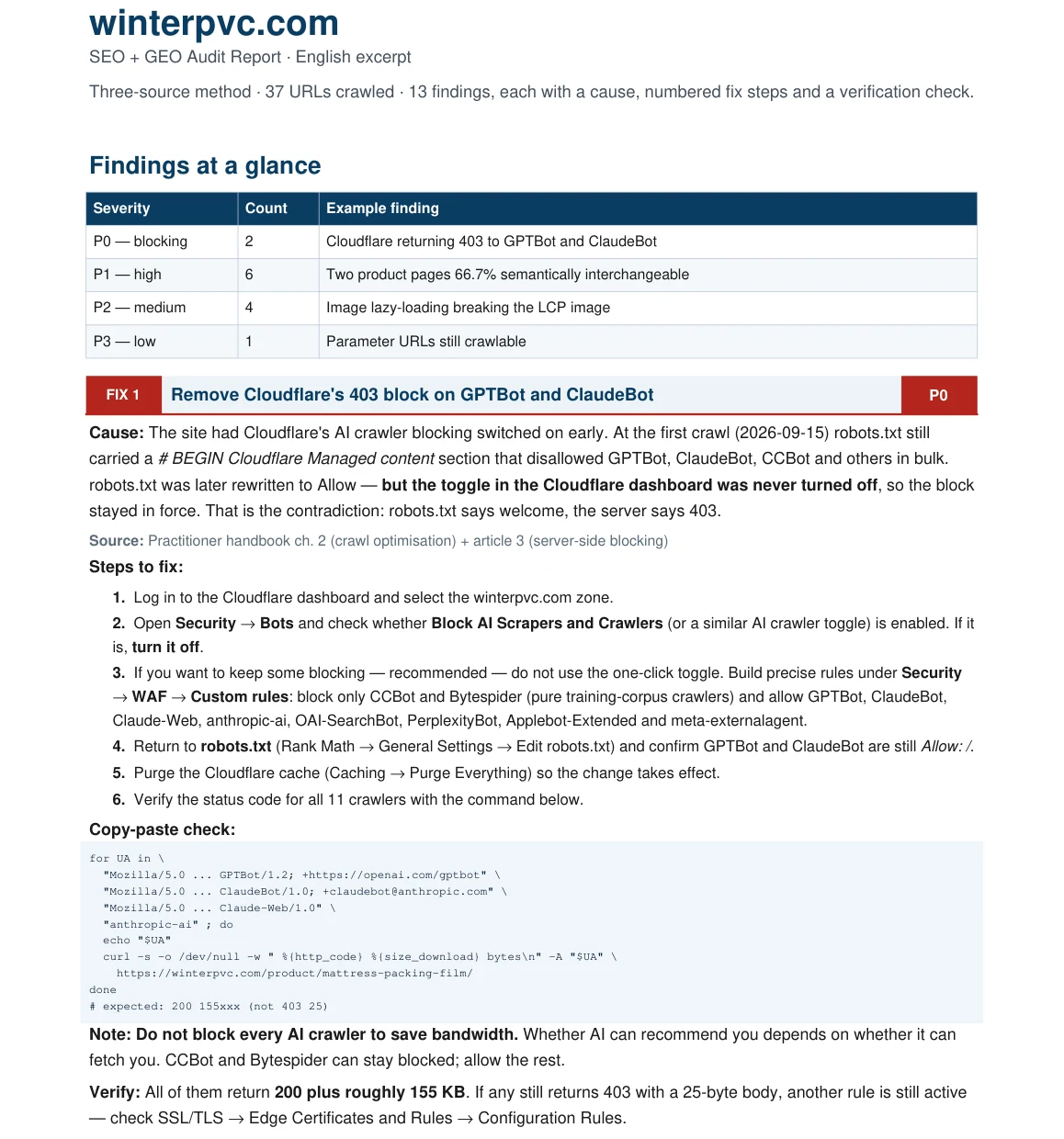
ranked by severity, each one with a cause, the exact admin path to fix it, and how to verify
the fix afterwards. The first card is the one that mattered most — the CDN rule that was
answering 403 to GPTBot and ClaudeBot.
The agent then told me exactly how to fix each problem.
What the Audit Actually Found
Across 37 URLs, the technical layer was clean — every one of the 13 checks passed. So the
real problems were not technical at all:
| What I measured | Result |
|---|---|
| Technical checks (13 items) | All passed — 37/37 URLs return HTTP 200 |
| AI crawler access (11 User-Agents) | 5 blocked with HTTP 403 |
| Content surviving without JavaScript | More than 93% — the content is in the HTML |
| Evidence density in page body copy | 4 pages below 0.10, best page 0.45 |
| Semantic overlap between 2 product pages | 66.7% of sentences interchangeable |
| Homepage links pointing into content | 6 of 8 unindexed pages had zero |
| Database time by plugin | One plugin accounted for 53% of the total |
Two weeks later, the number of unindexed pages dropped from 15 to 9.
Whether that turns into traffic is a slower and messier question. I’m tracking that side of
it separately, page by page, in a three-month log of what
Surfer SEO actually changed on this site.
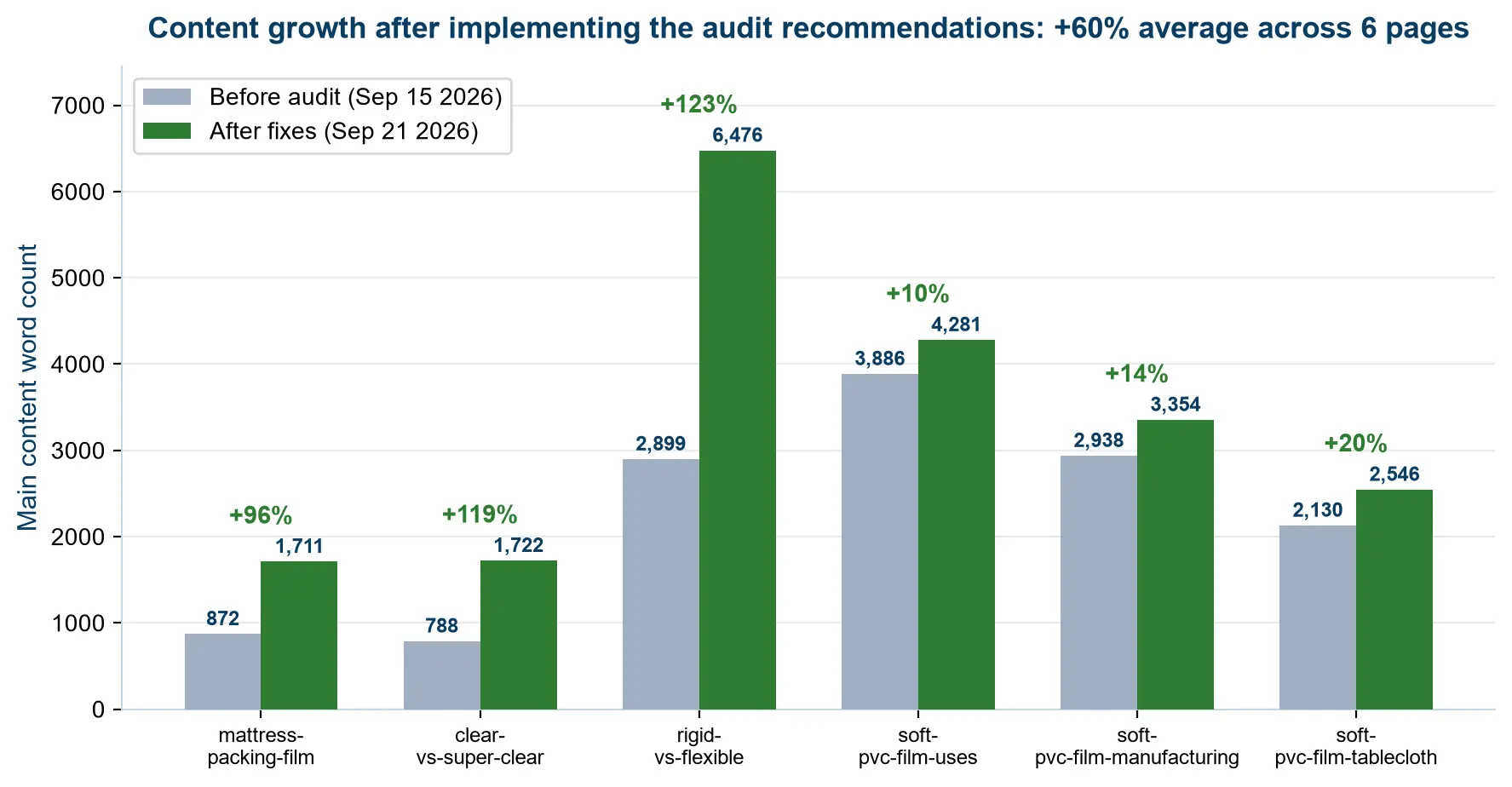
length grew by 60% on average across six pages, with two pages more than doubling.
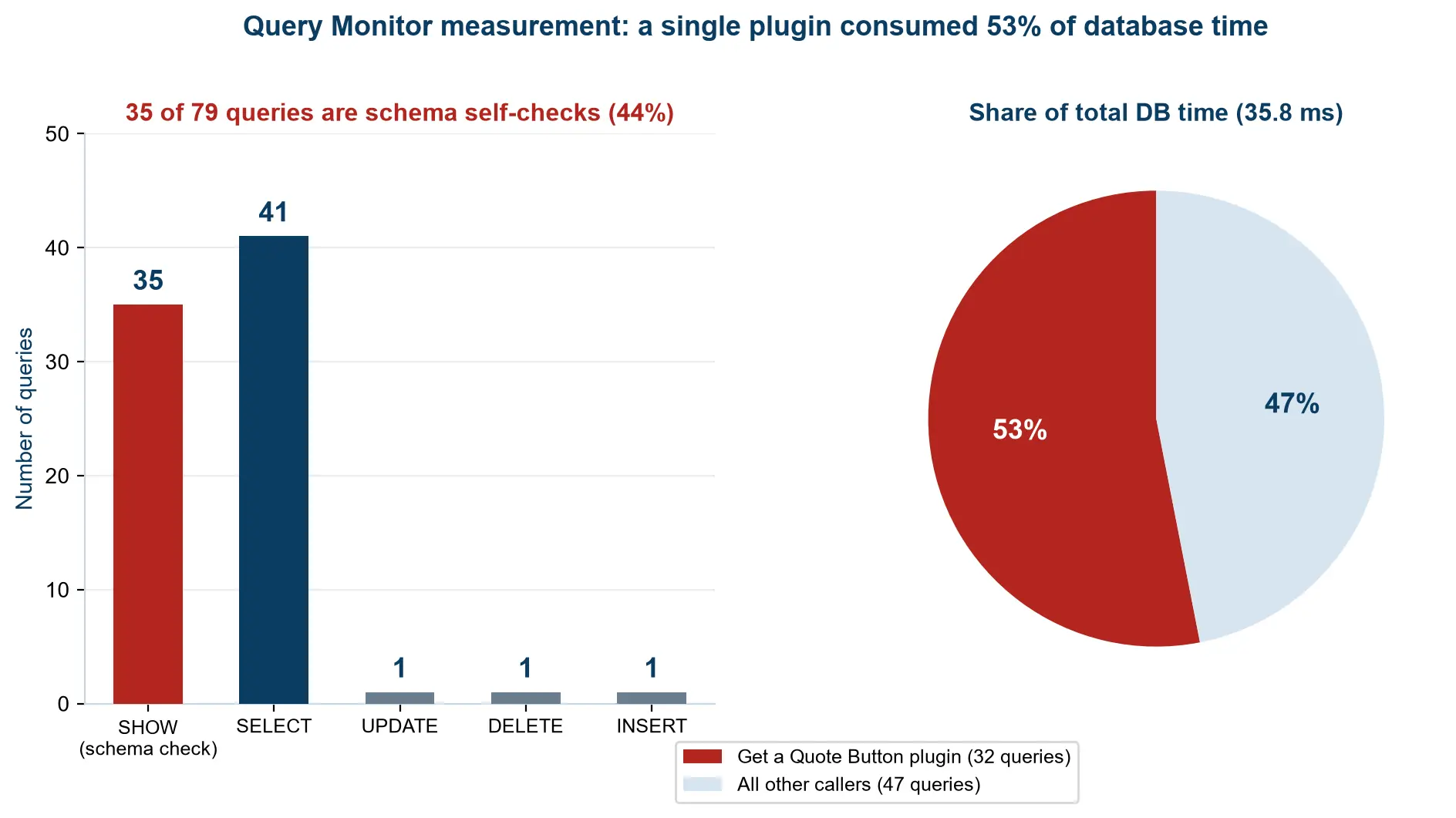
queries per page load, 35 were schema self-checks — and a single plugin accounted for 53%
of total database time. Fixing it cut that time in half.
Conclusion
This article is about how to run a website audit. Use an AI agent to find and fix the
problems your website has — and raise your ranking in Google.
If you only do one thing after reading this: install Query Monitor, then open your CDN or
hosting dashboard and check whether any AI crawler rule is still active. That single check
was where my biggest problem was hiding.
Frequently Asked Questions
Do I need to know how to code to run a website audit?
No. The tools do the measuring — Query Monitor reports what is happening inside WordPress, and a coding agent writes and runs the comparison scripts for you. What you do need is the ability to ask precise questions, such as whether GPTBot gets a 403 while Googlebot gets a 200 on the same URL. Vague questions get vague answers.
Why would an AI crawler get a 403 if my robots.txt allows it?
Because robots.txt is a request, not a gate. It is read by well-behaved crawlers, but the actual blocking happens at a different layer — normally your CDN or WAF. On my site robots.txt said Allow for GPTBot and ClaudeBot while the CDN edge rule returned HTTP 403 to five of eleven AI user-agents before WordPress was ever reached. Nothing inside WordPress could have revealed that, which is why the test has to run from the outside.
How do I check whether AI crawlers can read my site?
Send the real AI crawler user-agents to the same URL and compare the status codes. I tested eleven of them — Googlebot, OAI-SearchBot, ChatGPT-User, PerplexityBot, Applebot-Extended, meta-externalagent, GPTBot, ClaudeBot, Claude-Web, CCBot and Bytespider — and ran the same test against a control site on the same WordPress stack, to prove the difference came from configuration rather than from the platform.
What is evidence density, and why does it matter?
Evidence density is the share of a page’s word count that carries specifics — numbers, tolerances, standards, measurements — rather than general claims. A 4,000-word page with no numbers has low evidence density, and both search engines and AI systems reward the version that can be quoted. Four pages on my site sat below 0.10, while the best page reached 0.45.
Is it safe to leave Query Monitor installed on a live site?
Query Monitor only runs for logged-in administrators, so visitors never see it. That said, once you have your measurements, deactivate it — every active plugin registers hooks that run on every request. When I measured it, the site had 1,109 hook callbacks registered across 15 plugins.
Can I run this audit on a site that isn’t built with WordPress?
Yes, most of it. The parts that matter most — the AI crawler access test, the JavaScript dependency test and the near-duplicate comparison — run from the outside and do not care what the site is built on. Only the Query Monitor step is WordPress-specific; on another platform you would use its own profiler instead.
How often should I run a website audit?
I run the full audit once a quarter, and re-run the quick checks after any change to the CDN, robots.txt or plugin stack. Configuration is where the invisible problems live, and configuration changes silently — mine had been blocking AI crawlers for months before I noticed.
All my technical SEO checks pass. Does that mean my site is fine?
Not necessarily, and that was the main lesson from this audit. All 13 technical checks passed across 37 URLs: zero missing titles, zero duplicate H1s and 100% image ALT coverage. The problems were elsewhere entirely — a CDN rule, four pages with thin evidence, two near-duplicate product pages and a plugin eating 53% of database time. Technical hygiene is the floor, not the ceiling.