Should You Block GPTBot? What 7 Days of Server Logs Showed
Quick Context: I spent the last few months assuming my AI visibility problem was a content problem — that my pages were too thin, too new, or too boring to be quoted. Then I pulled eight days of raw server logs for this blog. GPTBot requested my site 14 times and got a rate-limit error 14 times. OpenAI’s search crawler made 22 requests and never asked for a single page. Googlebot read 3 of my 15 pages. This is the log, the numbers, and what I did about it.
What GPTBot Is, and What It Asked My Server For
GPTBot is OpenAI’s web crawler. It announces itself in the user agent string, and OpenAI publishes the IP ranges it crawls from — which is useful, because it lets you tell a real crawler from something wearing the name. In my logs the requests came from inside those published ranges, so I am treating them as genuine rather than spoofed.
There is a second OpenAI crawler that matters more for visibility than people realise, and it behaved differently. OAI-SearchBot is the one tied to search-style retrieval; ChatGPT-User is used when someone actually asks about a page. Both are separate from GPTBot, which is primarily about training and indexing. If you are trying to work out why your site does or does not appear in AI answers, lumping all three together will hide the answer — they get treated differently by servers, and on my site they were treated very differently indeed.
The chatgpt crawler user agent, and why the name matters
Every one of these crawlers carries its own string, and the string is the only handle you have when you are reading a log at two in the morning. I checked three things for each request: the user agent, whether the IP sat inside the published range, and the status code the server returned. That third column is where the story is. You can have a perfectly allowed crawler, with a valid identity, being turned away 100% of the time — and nothing in robots.txt will tell you that.
The Method: 4,265 Log Lines, Eight Days, No Guessing
The raw access log for benchjournal.com covered 2026-10-12 to 2026-10-19 (UTC) and contained 4,265 parseable lines; 168 rows were discarded because the columns were misaligned and the user agent field could not be trusted. The sitemap listed 15 URLs at the time. I counted requests per crawler, unique URLs touched, and status codes, then cross-checked the crawlers against the sitemap to see which pages were actually read.
Two limits belong at the front, not in the footnotes. First, a log proves fetching, not indexing — a 200 means the server served the file, not that Google stored it. Second, this window is eight days, which is long enough to see a pattern and short enough to miss a seasonal one. I did not pull indexing data for this round, so every claim below is about what crawled, never about what ranked.
That is the whole check, by the way: request volume per GPTBot visit, the status code attached to each one, and the URLs it never asked for. Three columns and no subscription.
One counting note, because I have seen the number quoted two ways. My AI total includes Meta’s crawler alongside GPTBot, OAI-SearchBot and Bytespider: 25 + 22 + 14 + 8 = 69, which is 1.6% of 4,265. Strip Meta’s 8 requests out and you get 61 requests and 1.4%. Same finding, slightly smaller denominator — I am showing the wider count because Meta’s agent is asking for pages I would like cited too.
What the Logs Showed: GPTBot Got 429 Fourteen Times Out of Fourteen
Here is the crawler table, ordered by request count. The last two columns are the ones nobody looks at until their AI visibility disappears.
| Crawler | Requests | 2xx success | Unique pages |
|---|---|---|---|
| PetalBot (Huawei) | 104 | 93.3% | 20 |
| Googlebot | 63 | 44.4% | 11 |
| Bingbot | 50 | 92.0% | 41 |
| Baiduspider | 35 | 100.0% | 33 |
| Bytespider | 25 | 92.0% | 23 |
| OAI-SearchBot | 22 | 50.0% | 0 |
| GPTBot | 14 | 0.0% | 0 |
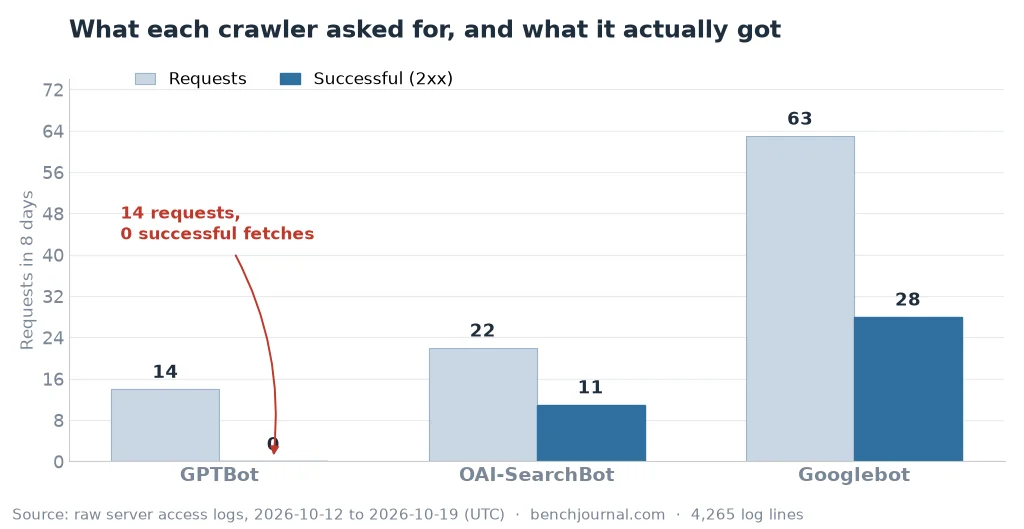
14 requests, 14 rate-limit errors, zero completed fetches. The blocked resources were not only pages: the sitemap index and the image files were refused too. That detail is what makes the failure so complete. A crawler that cannot read your sitemap has to discover URLs the slow way; a crawler that cannot read your images sees a page with holes in it. If the goal is to be quoted accurately by a machine, “it got the HTML text” is not the same as “it got the page.”
To be precise about what 429 means: it is too many requests, not “go away forever.” Something in front of the site — a caching layer, a security rule, a per-interval cap — decided the crawler was asking faster than the policy allowed. The permission layer passed: robots.txt was fine, the IP was genuine. The delivery layer is what failed, and that layer is invisible from every SEO tool you own.
OAI-SearchBot Never Left robots.txt
Twenty-two requests, and every single one asked for /robots.txt. Not one page, not one image, not the sitemap. It arrived, read the rules, and then went no further — which is either a very patient crawler or one that decided this site had nothing worth the budget.
I cannot tell you which, and that is the honest limit of log analysis: a log shows the requests that happened, not the reasoning behind the ones that did not. What I can tell you is the shape of the visit — 22 trips to the front door and none into the hallway — and that this is the crawler most directly connected to being surfaced in search-style AI answers. A site that gets only robots.txt visits from it is not building a retrieval footprint.
Googlebot Only Touched 3 of My 15 Pages
This was the finding that embarrassed me, because it has nothing to do with AI. In eight days, Googlebot requested 63 times across 11 unique URLs, but only 3 of my 15 sitemap pages were read. Meanwhile 35 of Googlebot’s requests went to /robots.txt: 23 of them were 301 redirects from the www host to the non-www host, and 12 were 304 not-modified responses.
Read that again as a budget story. My crawler, on a site with 15 pages, spent more requests on the rules file than on the pages — and half of those were redirect hops it had to follow every time. The redirect itself is correct (www to non-www is the right canonical direction), but if anything in your sitemap or internal links still uses the www form, you are paying that hop on every visit.
The same audit found the other end of this: Googlebot was missing 12 of 15 pages, while the AI crawlers were missing 11 of 15. The pages my AI-visibility write-up was analysing — the audit page and the AI visibility page itself — had no AI crawler visit at all in the window. The content was live; the crawlers simply were not there.
The Same Setup on My Other Site: 363 Requests, 88.9% Rate-Limited
This is the part that turns an anecdote into a diagnosis. I run a second site, winterpvc.com, a B2B PVC film supplier, on the same hosting account. Over the same window it received 8,669 requests against benchjournal’s 4,265 — and GPTBot asked it for 363 resources.
| Metric | winterpvc.com | benchjournal.com |
|---|---|---|
| Total requests | 8,669 | 4,265 |
| GPTBot requests | 363 | 14 |
| GPTBot rate-limited (429) | 323 (88.9%) | 14 (100%) |
| GPTBot successful (200) | 40 (11.0%) | 0 |
| AI crawlers as share of all requests | 9.2% | 1.6% |
| PerplexityBot sitemap coverage | 39/39 (100%) | no requests recorded |
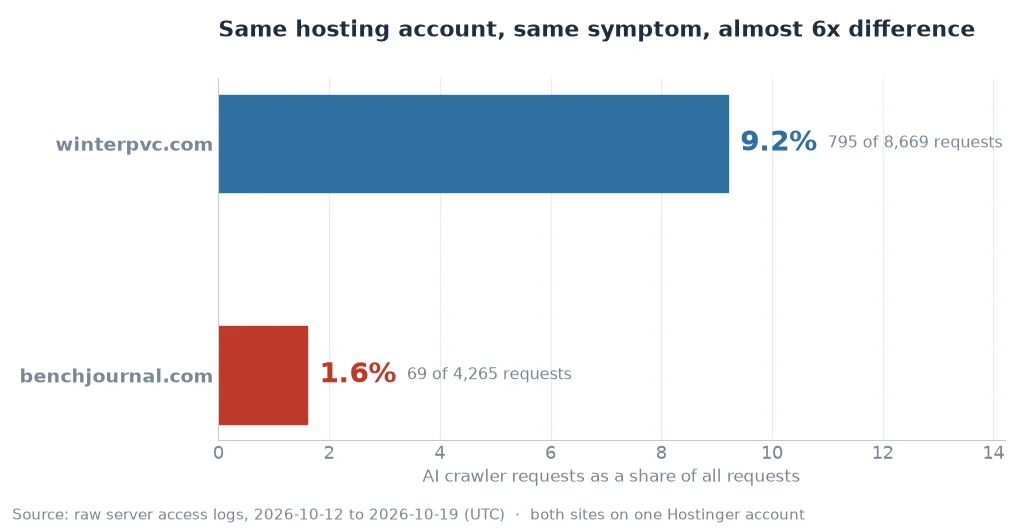
Two things in this table are not about me being a bad writer. The first is that a site with 57 to 60 image requests per page generates exactly the request burst that gets rate-limited first: media-library files accounted for 97 of the 331 rate-limit responses across both sites. The second is that the same policy produced two different outcomes depending on volume — the bigger site got through 11% of the time, the smaller one never did. Same account, same rules, both broken. If you are shopping for a hosting plan and wondering whether this is worth checking before you sign, my B2B site is the case where I paid the discovery cost for you.
What I am not claiming: that this explains every gap in AI visibility. PerplexityBot covered 39 of 39 pages on that site and 0 pages here, and I did not measure whether either site’s pages were actually cited. Rate limiting is a real, measurable failure; the size of its effect on citations is something I have not established.
Should I Block GPTBot? The Answer Depends on What You Want
People ask “should i block gpt bot” as if it were one switch, but there are three different situations behind that question, and they need different answers.
If you are one of the websites that are blocking GPTBot on purpose
That is a policy decision, and I am not going to talk you out of it. Blocking is explicit, reversible and documented — and it is the opposite of what happened on my site, where the crawler was allowed in robots.txt and still never got through.
If you want to be read and quoted
Then the job is not robots.txt, it is delivery — and that is where I failed. A crawler you allowed but rate-limited is the worst of both worlds: you absorbed the cost of being crawled, and you got none of the benefit of being read.
If you do not know what you want yet
Then the answer is: measure first. Pull a week of logs, count GPTBot’s status codes, and decide with the number in front of you instead of the fear. That takes about fifteen minutes and it is the only step that produces evidence rather than opinion.
What I Did Not Do
When the problem is “AI can’t read us,” there is a whole genre of advice waiting, and most of it is unsupported by the companies being blamed. I checked the official documentation for each of these and skipped all three:
- I did not write AI-specific schema. Google has not defined any structured data type for AI answers. Adding one would have been decoration.
- I did not create an
llms.txt. Google does not require it. Two crawlers did request one on the other site, which tells you the convention is circulating — not that it is required. - I did not rewrite my content for AI. There is no official guidance about chunk sizes, “AI-friendly” headings, or machines preferring some sentence pattern. What I did instead was fix the delivery layer, so GPTBot could finish reading a page instead of timing out on the images.
How to Check Your Own Logs in 15 Minutes
You do not need a paid tool for any of this. You need the raw access log from your host and something that can filter text.
- Find the raw log. On most cPanel or hPanel hosts it is under metrics or access logs, as a plain
.gzfile. Not the analytics dashboard — the log itself. - Grep for each crawler name individually: GPTBot, OAI-SearchBot, ChatGPT-User, PerplexityBot, ClaudeBot, Googlebot. Do not search for “bot”; you will get scanners.
- Count the status codes next to each. A crawler with 100% 429 or 403 is being refused. A crawler with 200s on pages and images is fine.
- Check whether the sitemap was fetched and with what code. If it is 429, discovery is broken for that crawler no matter how good your content is.
- Compare against your sitemap list to see which URLs were never touched at all. That gap is where your internal linking problem hides — my own site had 12 of 15 pages unvisited by Googlebot.
If you find rate limiting, the fix is on the server or CDN side: raise the per-interval cap for verified crawler IP ranges, or exempt them from the security rule that is tripping. If you find 403s instead of 429s, something is blocking rather than throttling, and the audit I wrote on technical SEO checks for small sites covers the order to fix those in. If the finding is that crawlers are absent entirely, the next suspect is URL discovery, not content — which is what pushed me to write about auditing my site with an AI agent in the first place.
What This Proves and What It Does Not
What the logs prove: the identity layer is fine (zero real crawlers hit a 403), the delivery layer is broken for at least two AI crawlers (GPTBot and OAI-SearchBot), and Googlebot’s coverage of a 15-page site is far worse than I assumed. What they do not prove: that fixing this will make my pages appear in AI answers. That requires a second window after the fix, with the same measurement method — and I have already argued, in how long SEO takes to show results, that nine days is not a window, it is a rumour.
The uncomfortable version of this finding is that content work and crawl work are separate jobs, and I had spent months on the first while the second was failing silently. My earlier post on AI search impressions was built on the assumption that the content was the variable. The logs say the variable I never checked was whether anyone could get in.
Frequently Asked Questions
What is GPTBot?
GPTBot is OpenAI’s web crawler. It identifies itself with the user agent GPTBot, and OpenAI publishes the IP ranges it crawls from, so you can verify whether a request is real or spoofed. On my site it requested pages, images, CSS and the sitemap, and every one of its 14 requests came back 429.
Why does GPTBot get a 429 error?
Because something in front of the site is rate-limiting it. A 429 means too many requests, not a block and not a permission problem: the crawler is allowed in robots.txt, but the server or a caching layer is refusing to serve it more than a few times per interval. In my case the same 429 pattern hit the sitemap and every image, which is why the crawler never assembled a complete page.
Should I block GPTBot in robots.txt?
Only if you have decided you do not want OpenAI using your content. Blocking is a policy choice, not an SEO tactic: Google does not reward it and does not penalise it. What I would not do is block it by accident through rate limiting, because that is the case where you get the costs without getting the decision.
Does blocking GPTBot hurt my SEO?
There is no Google guidance saying that blocking or allowing GPTBot changes your ranking. What does change is whether AI systems can read your pages well enough to quote them. I keep GPTBot allowed and spend my effort on making the site crawlable, which is a separate problem from being rankable.
How do I check if GPTBot is visiting my site?
Grep your raw access log for GPTBot and count the status codes next to it. You want to see 200s against pages, images and the sitemap. If you only see 429 or 403, the crawler is being turned away before it can read anything, and no amount of content work will fix that.
Does a 429 mean my site is blocked from ChatGPT?
Not blocked — refused at the moment of the request. That distinction matters: a block is a decision you make in robots.txt or a firewall, while a 429 is a threshold you crossed. I can show the 429s in my logs; I cannot show that they are why any particular answer omitted my site, and I am not going to claim otherwise.