Technical SEO Audit Checklist: The 30 Checks I Run (In This Order)
Quick Context: I run a small B2B site with about 40 URLs. This is the technical checklist I run before and after I touch anything — because if Google can’t crawl or index a page, nothing else I do to it matters. It is 30 checks, grouped by what breaks first. If you want the story of how I first found the biggest problem on my own site (a CDN quietly blocking crawlers), that’s in my website audit write-up; this page is the checklist itself.
The order matters more than the checklist
Most “SEO checklist” content starts with keywords and titles. That order is backwards for a small site, because a single technical fault can invalidate every content decision you make afterwards.
I run these groups in a fixed sequence:
Crawlability → Indexing → Rendering → On-page → Architecture → Security → AI access.
The logic is simple: if a crawler can’t fetch the page, if it’s excluded from the index, or if the content only exists after JavaScript runs, then optimising the title tag is wasted work. Find the blockers first, then improve what’s already reachable. That order is the structure of this technical SEO audit checklist.
Before I start, one related rule: don’t open an AI SEO tool until the basics are clean, or you’ll spend your time polishing pages that were never eligible in the first place. I wrote those pre-flight checks separately in my AI SEO checklist.
Group 1 — Crawlability and indexing (checks 1–6)
This is where the highest-impact, hardest-to-see problems live. Every check here is binary: either the page can be crawled and indexed, or it can’t.
- robots.txt isn’t blocking something you need crawled. Read it line by line, not just the first section. Disallow rules accumulate over time and nobody remembers why half of them are there.
- Check the layer above robots.txt. A firewall, WAF or CDN can return 403 to crawlers even when robots.txt welcomes them. This was my problem: robots.txt said “come in”, the CDN said “no”, and nothing in Search Console explained the contradiction.
- Your XML sitemap exists, is submitted, and only lists indexable URLs. A sitemap full of redirects, noindex pages or 404s teaches Google to trust it less.
- Canonical tags are self-referencing and consistent. Each page should point to itself unless you’re deliberately consolidating duplicates.
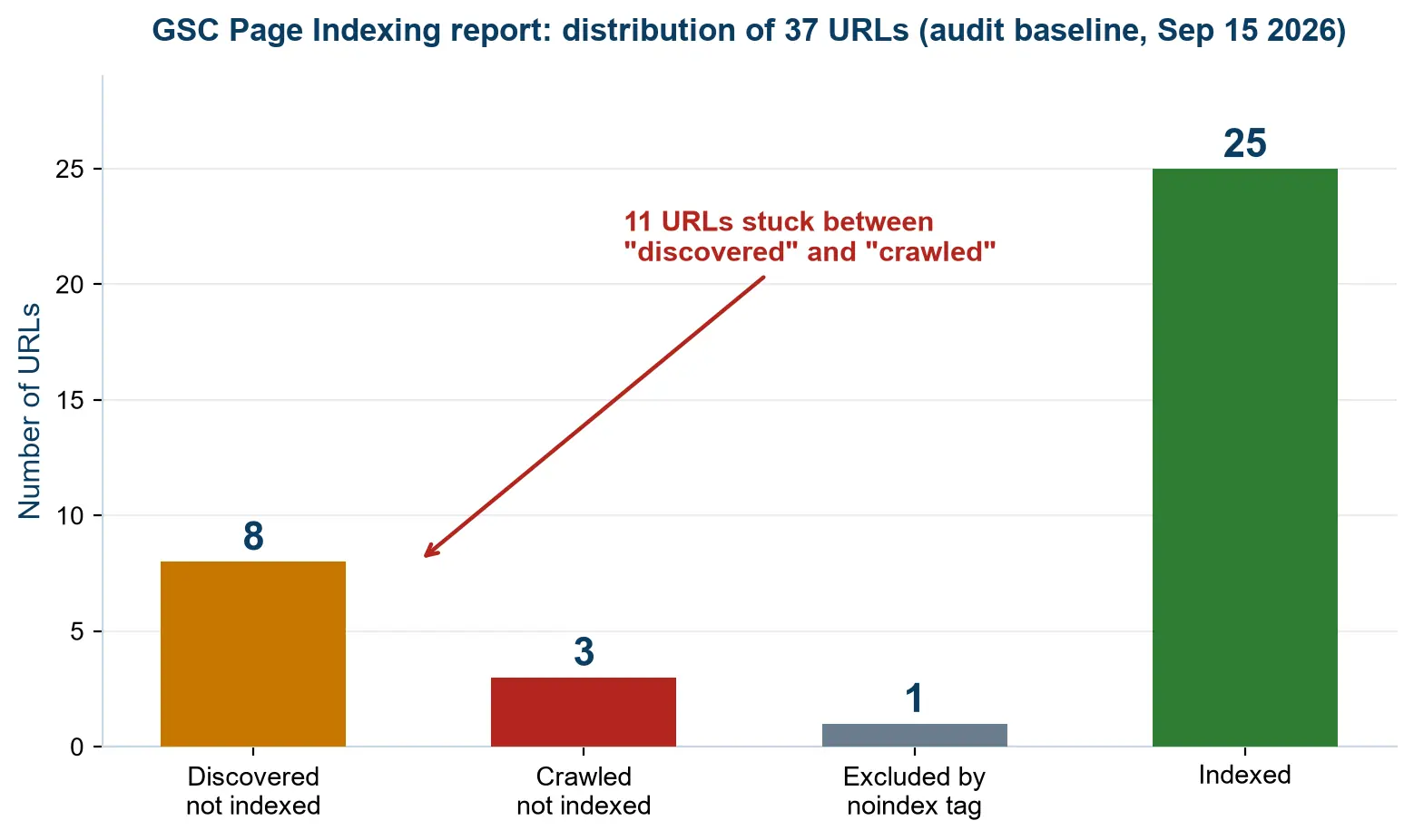
- Nothing is accidentally noindexed. Search Console’s Page Indexing report is the fastest way to see this — I check it before any other report.
- No broken links, redirect chains or soft 404s. A redirect chain of three hops costs crawl budget and leaks signal; a soft 404 sends mixed messages.
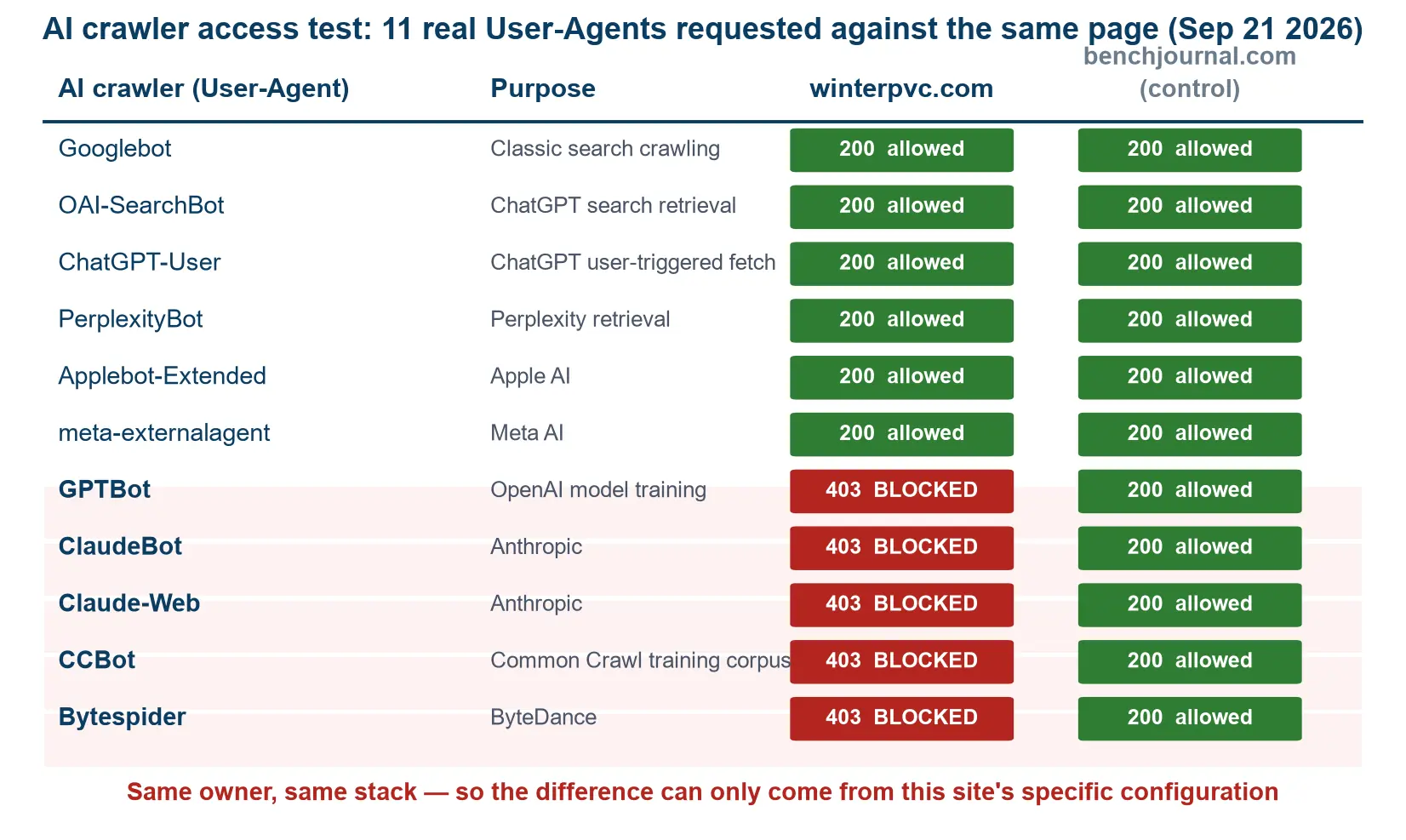
On that second check, I should be honest about what I don’t know. I found the conflict while crawling my own site with an AI agent, and I fixed it using the agent’s suggestions — but I have no idea how long it had been blocking crawlers. I have no clean before-and-after for it, so I’m not going to claim a recovery. The lesson is the check itself: robots.txt is not the only gate.
Group 2 — Speed and rendering (checks 7–11)
Rendering is the most commonly skipped group, and it’s the one that hides content from crawlers without any error message.
- Core Web Vitals are green. LCP, INP and CLS are reported in Search Console with no extra tools needed. Fix the one that’s red; ignore the rest.
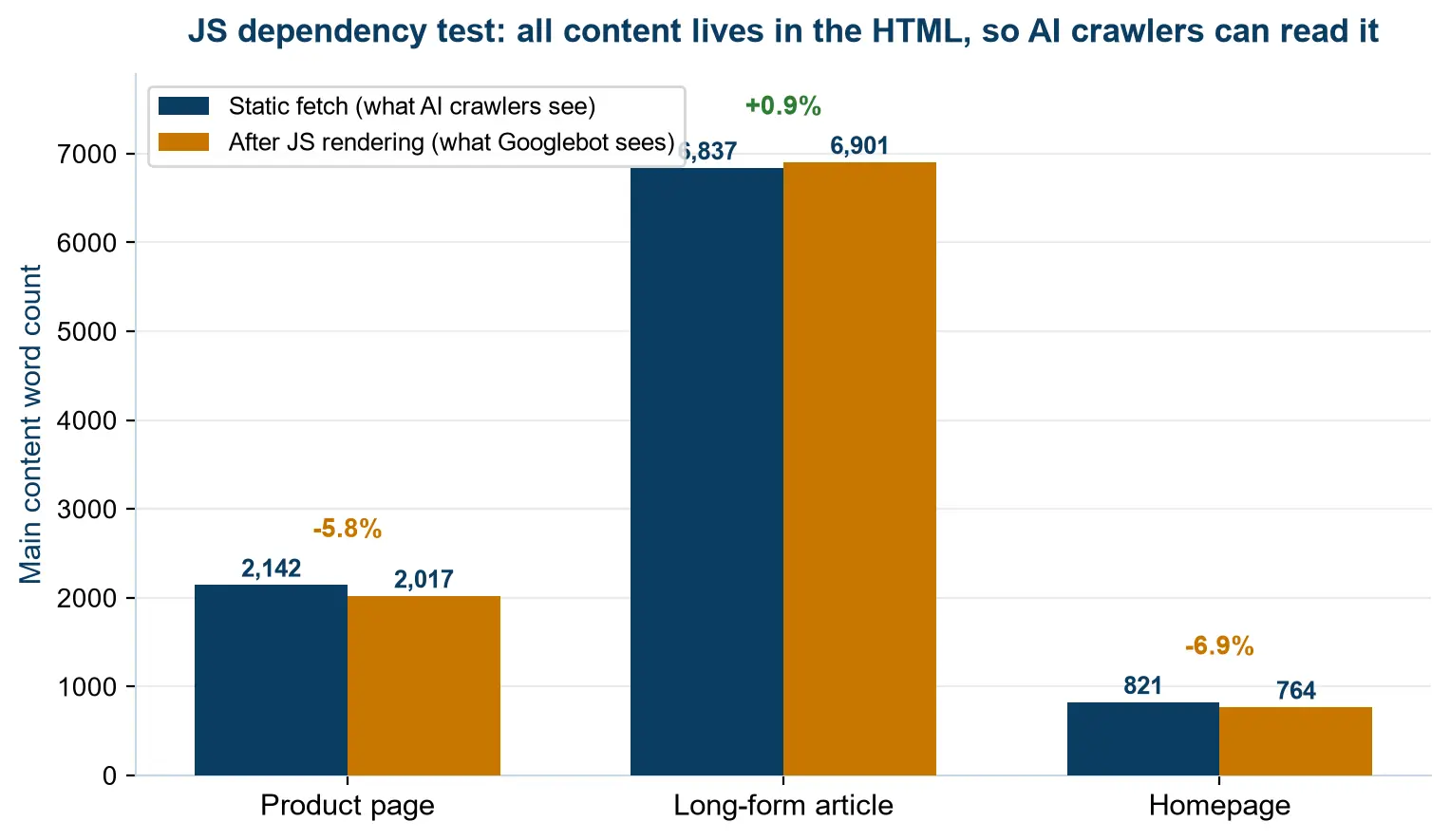
- The page still shows its content with JavaScript disabled. If your text only appears after scripts run, you’re relying on Google to render it — and AI crawlers often won’t.
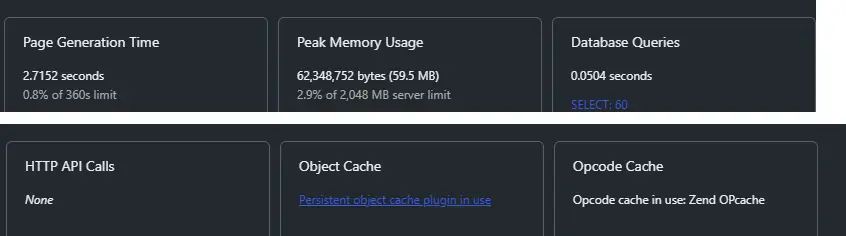
- Every script and plugin earns its place. This is the check that produced my biggest speed win: I used Query Monitor to see which scripts my site was loading, found several that were doing nothing useful, and removed them.
- Images are compressed and lazy-loaded. On a small site, image weight is usually the single largest page-size item.
- Viewport and tap targets are set for mobile. Most of a small B2B site’s traffic is mobile-assumed even when the buyers are on desktop.
Group 3 — On-page technical (checks 12–18)
Once a page is crawlable, indexable and rendered, these checks decide whether it can compete. This is the group most people start with — it’s also the group that matters least if the first two are broken. Think of it as the page SEO audit checklist: everything here can be checked one URL at a time.
- Every page has a unique title. Duplicates across pages are common on small sites with templated category pages.
- One H1 per page, headings in order. Skipping from H1 to H4 for visual reasons confuses structure; use CSS for looks, headings for meaning.
- Meta descriptions exist and aren’t duplicated. They don’t rank you, but they decide whether the result gets clicked.
- Every image has alt text. This was the finding on my own site: an audit reported missing alt text on 20 of 20 scored pages — 100% of the site. I fixed it in bulk with a plugin rather than by hand.
- Structured data validates. Run the pages that matter through a rich-results validator and fix errors, not warnings.
- No thin pages. A page that answers nothing is worse than no page: it dilutes the site and competes with your own content.
- No two pages competing for the same keyword. If two of your URLs target the same intent, merge or differentiate them deliberately.
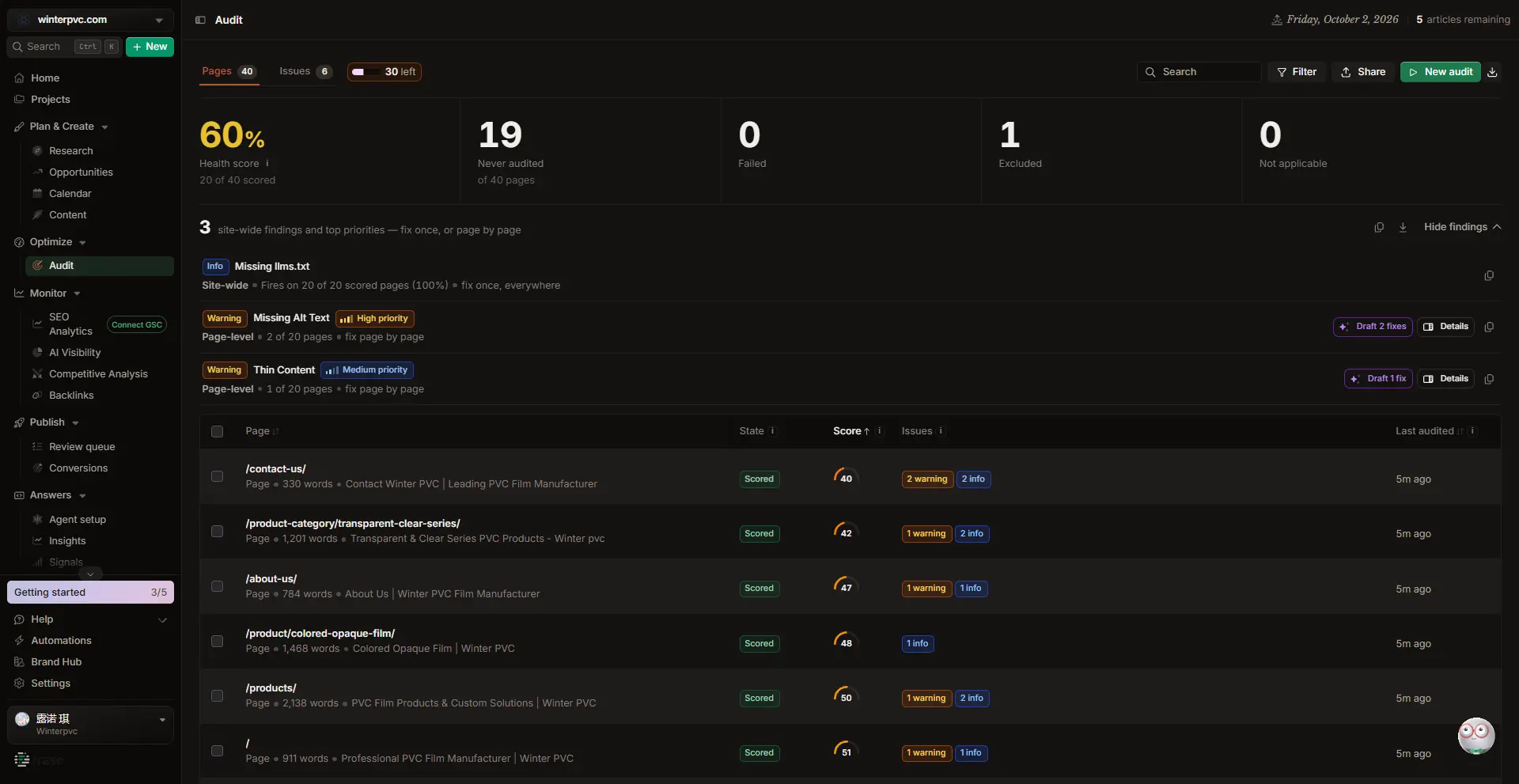
On alt text, the interesting part wasn’t the fix — it was that a site-wide finding is cheaper to fix than a page-level one. Fixing 20 pages by hand would have taken days; doing it once with a plugin took minutes. When you find the same problem on every page, look for the bulk fix.
Group 4 — Site architecture and internal links (checks 19–23)
Internal links are the only ranking signal you fully control, and on a small site they’re usually neglected rather than misused.
- Key pages are within three clicks of the homepage. Deeper than that and both crawlers and people treat them as unimportant.
- No orphan pages. A page with no internal links pointing to it is effectively invisible — it needs at least one contextual link from a relevant page.
- Every money page receives internal links. Product and service pages should be linked from the articles that logically lead to them.
- Breadcrumbs are present. They give crawlers a second path through the site and give users a way back.
- Anchor text describes the destination. “Read more” wastes an opportunity; “technical SEO audit checklist” tells both the reader and Google what’s behind the link.
I’ll admit this is the group I’ve been slowest on. When I finally checked my own blog properly, I found two examples that no dashboard had flagged. My nine-day follow-up post had zero outbound internal links — nothing pointing from it to the articles that logically come next. And my Frase review still pointed at a URL I had renamed earlier, so anyone following that link hit a dead end.
Neither problem appeared in any report. An orphaned page and a broken internal link are silent failures: the site looks fine, the page loads fine, and the only symptom is that nothing improves. That’s why this group is on a technical checklist even though it isn’t strictly “technical”.
Group 5 — Security and trust (checks 24–26)
- HTTPS everywhere, no mixed content. One insecure asset can trigger a browser warning that kills trust instantly.
- The certificate is valid and auto-renewing. An expired certificate takes the whole site offline for users, not just rankings.
- No security issues or manual actions in Search Console. Check it monthly; these are the only two things that can remove a site from results entirely.
Group 6 — AI and crawler access (checks 27–30)
This group didn’t exist in most checklists two years ago. It matters now because a growing share of B2B research happens inside AI answers rather than in ten blue links.
- Your robots.txt rules for AI crawlers are intentional. Blocking GPTBot and friends is a legitimate choice, but make it a decision rather than an accident.
- Your CDN or WAF isn’t returning 403 to AI crawlers. This is exactly what happened to me, and it’s invisible from inside your CMS.
- Check the Generative AI report in Search Console. If your pages are being shown in AI answers, you’ll see impressions there — a different surface from normal search.
- Consider llms.txt, but don’t expect much. It isn’t an official standard and no major AI system has committed to it. Publish it if you like; don’t count on it.
I’ve written separately about what a handful of AI search impressions actually means, including how many of them turned into nothing at all.
The copyable checklist (and what I skip)
Here is the whole technical SEO audit checklist as a plain list you can paste into a spreadsheet or a notes app. One column for the check, one for the result on your site, one for the fix. If you want the shortened version for a specific site, this doubles as a technical site audit checklist you can trim to the groups that apply to you.
| Group | Checks | What “pass” looks like |
|---|---|---|
| Crawlability & indexing | 1–6 | Every page you care about returns 200, is in the sitemap, and can be fetched |
| Speed & rendering | 7–11 | Vitals are not red, and content is visible without JavaScript |
| On-page technical | 12–18 | Unique titles, one H1, alt text everywhere, no duplicate intents |
| Architecture & internal links | 19–23 | Nothing orphaned, money pages linked, anchors descriptive |
| Security & trust | 24–26 | Valid certificate, no mixed content, no GSC security flags |
| AI & crawler access | 27–30 | AI crawler rules are deliberate and nothing blocks them by accident |
What I skip, as a small site with limited hours: log-file analysis, hreflang, pagination tuning, and complex schema beyond what I can validate quickly. On a 40-page site they’re not where the returns are.
And being honest about it: I don’t have a formal “skip list”. I’d rather run every check I can at this stage, because I don’t yet know which ones matter for my niche. The skipping comes later, once I have data. What I would say to anyone starting out is the opposite of a shortcut — run the checks, write down the results, and let your own data tell you which ones to drop.
Did any of this change my traffic?
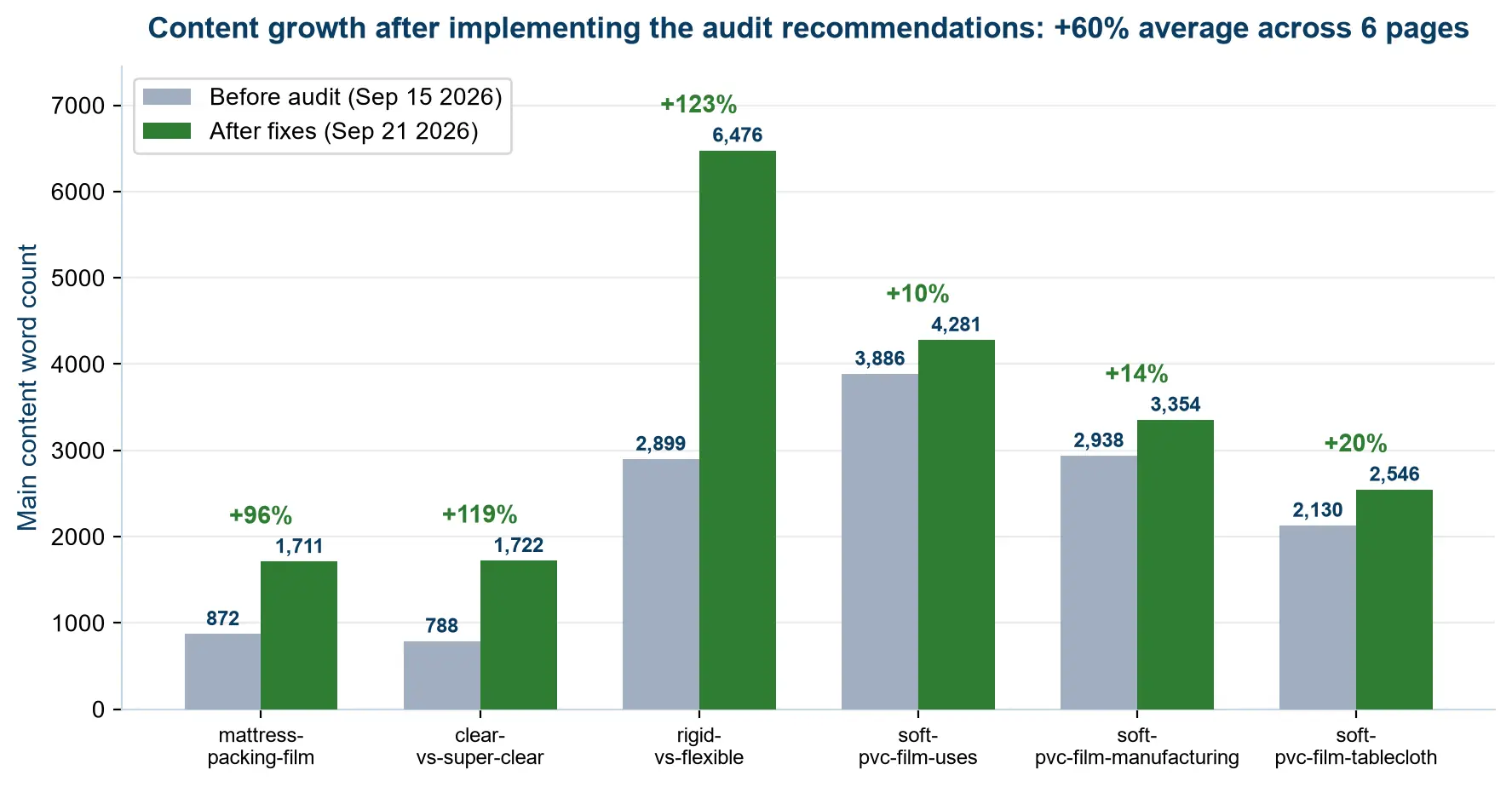
Partly, and not in a way I can prove. After fixing the crawl problem and removing unnecessary scripts, impressions in Search Console went up. But my site is young, several things changed at once, and I don’t have a clean before-and-after window.
So the honest answer is: I can’t attribute the increase to the audit. What I can say is that the audit found a problem that no dashboard had shown me, and that fixing it was free.
Frequently Asked Questions
What is a technical SEO audit?
A technical SEO audit checks whether search engines can crawl, render, index and understand your pages — independent of whether the content itself is any good. It covers robots.txt, sitemaps, canonical tags, indexation status, page speed, rendering, on-page elements, internal links, security and, increasingly, AI crawler access.
How often should I run a technical SEO audit?
On a small site: after any change to plugins, theme, CDN or hosting, and otherwise once a month. Full audits aren’t needed weekly — but the 6 crawlability checks are worth re-running whenever something in your stack changes, because that’s where silent failures come from.
What tools do I need for a technical SEO audit?
Google Search Console covers most of it for free: Page Indexing, Core Web Vitals and Security Issues. I add three things: a crawler to test fetchability from the outside, Query Monitor to see which scripts a page is loading, and a validator for structured data. You don’t need a paid suite to start.
What is the difference between an SEO audit and a technical SEO audit?
An SEO audit usually includes content, keywords and off-page factors. What people call a technical SEO audit checklist (or an SEO technical audit checklist) deliberately ignores all of that and asks only whether your pages are technically reachable and readable. That is why I run the technical part first: it determines whether the other work is even eligible to rank.
Can I do a technical SEO audit for free?
Yes. Search Console plus a free crawler covers checks 1 to 6, 12 to 14 and 24 to 26. The tools I actually used on my own site were Search Console, an AI agent crawling from the outside, Query Monitor, a JavaScript dependency test, and a rich-results validator.
What should I fix first in a technical SEO audit?
The first group: crawlability and indexing. A single 403 at the CDN layer or one stray noindex makes everything downstream pointless. Fix retrieval before you fix presentation.
Conclusion
A technical checklist won’t raise your rankings on its own. What it does is stop you from wasting months on pages that were never eligible — which, for a small site with limited hours, is the same thing as a ranking improvement. Run the technical SEO audit checklist in order, once, and you’ll know which problems are real and which ones you were about to invent.
If you want the rest of the story: the audit that found my crawl problem is here, the checks I run before touching an AI tool are here, and my comparison of the SEO tools I’ve actually paid for is here.
2 Comments