B2B SEO Tools: What I Pay For (and What I Refuse To Buy)
Quick Context: I run two sites — a small B2B PVC film site with about 40 pages, and this blog. In that time I have paid for exactly two SEO tools. This is the whole B2B SEO tools stack I use, what each part costs, and what I deliberately refuse to buy. Most B2B SEO tools roundups are written by people selling tools; this one is written by someone who has to justify every subscription out of his own pocket. I’m not a tool collector: most of what I’ve tried, I stopped using.
Some links in this post are affiliate links. If you subscribe, I may earn a commission at no extra cost to you.
The rule I follow: free first, always
Before I pay for anything, I ask one question: can Search Console already tell me this? On a 40-page site, the answer is usually yes — indexation status, Core Web Vitals, which queries you appear for, average position, security issues. All of it is free, and none of it has a paid equivalent that is meaningfully better at this scale.
Paid tools only earn their place when they answer a question Search Console structurally cannot. For me that is two questions: “how does this one page compare to the pages currently ranking for my target keyword?” and “where is my whole site weak, structurally?” That’s it. Everything else in my stack is free.
The free layer I use every day
This is not a “best free tools” list I copied from somewhere. These are the ones I open weekly:
| Tool | What I use it for | Cost |
|---|---|---|
| Google Search Console | Everything: indexation, queries, positions, Core Web Vitals, security | $0 |
| Rank Math (free tier) | Titles, meta descriptions, schema, on-page checks | $0 |
| Query Monitor (WordPress plugin) | See which scripts and database queries a page actually loads | $0 |
| Fix Alt Text (WordPress plugin) | Bulk-fix missing alt text across the site | $0 |
| Rich Results Test | Validate structured data before publishing | $0 |
| A hand-written outline | Reading the top 5 results for a keyword and taking notes | $0 |
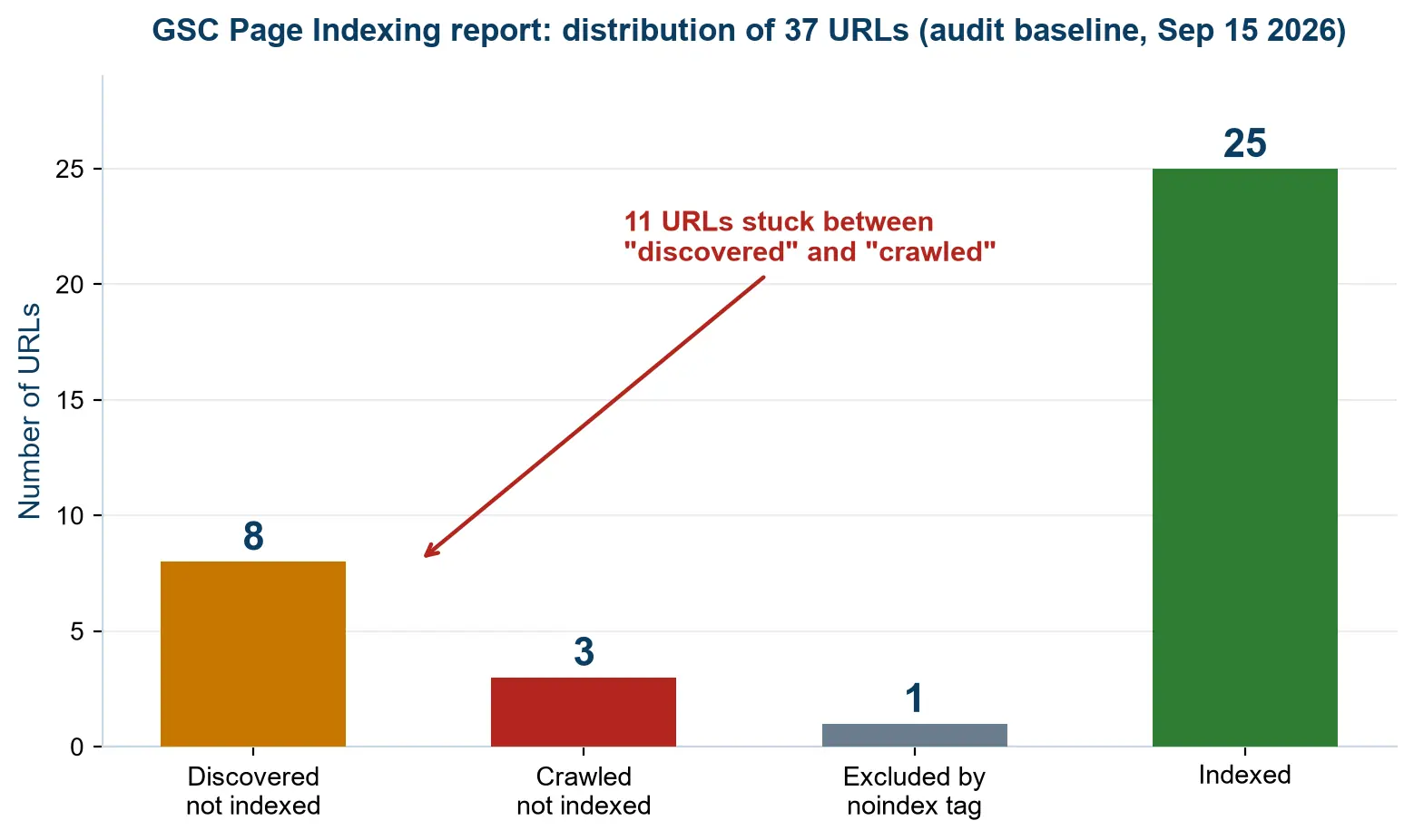
Two of those replacements saved me real money this year. Query Monitor found scripts my site was loading for no reason, and Fix Alt Text fixed a problem on 20 of 20 scored pages in minutes instead of days. Neither cost anything.
If you want the fuller technical version of this list, I wrote it up separately as a technical SEO audit checklist — 30 checks, all doable with free tools.
The paid layer: the two tools I tried, and why I let both lapse
Here is the honest split. One of these answers “how should this page be built”, the other answers “where is my site weak” — and I currently pay for neither. My Surfer run lasted about a month on one page; my Frase trial expired without a renewal. What follows is what each one actually told me, because that is the part that decides whether it is worth your money.
1. Surfer SEO — for building one page properly. I ran my PVC film thickness guide through its Content Editor and it graded the page 61. More useful than the number was the entity list: the terms and concepts the pages currently ranking for that keyword all cover, which I could then mark as covered or missing in my draft. It caught gaps I’d have missed — an explicit PVC vs PET comparison, and a FAQ section.
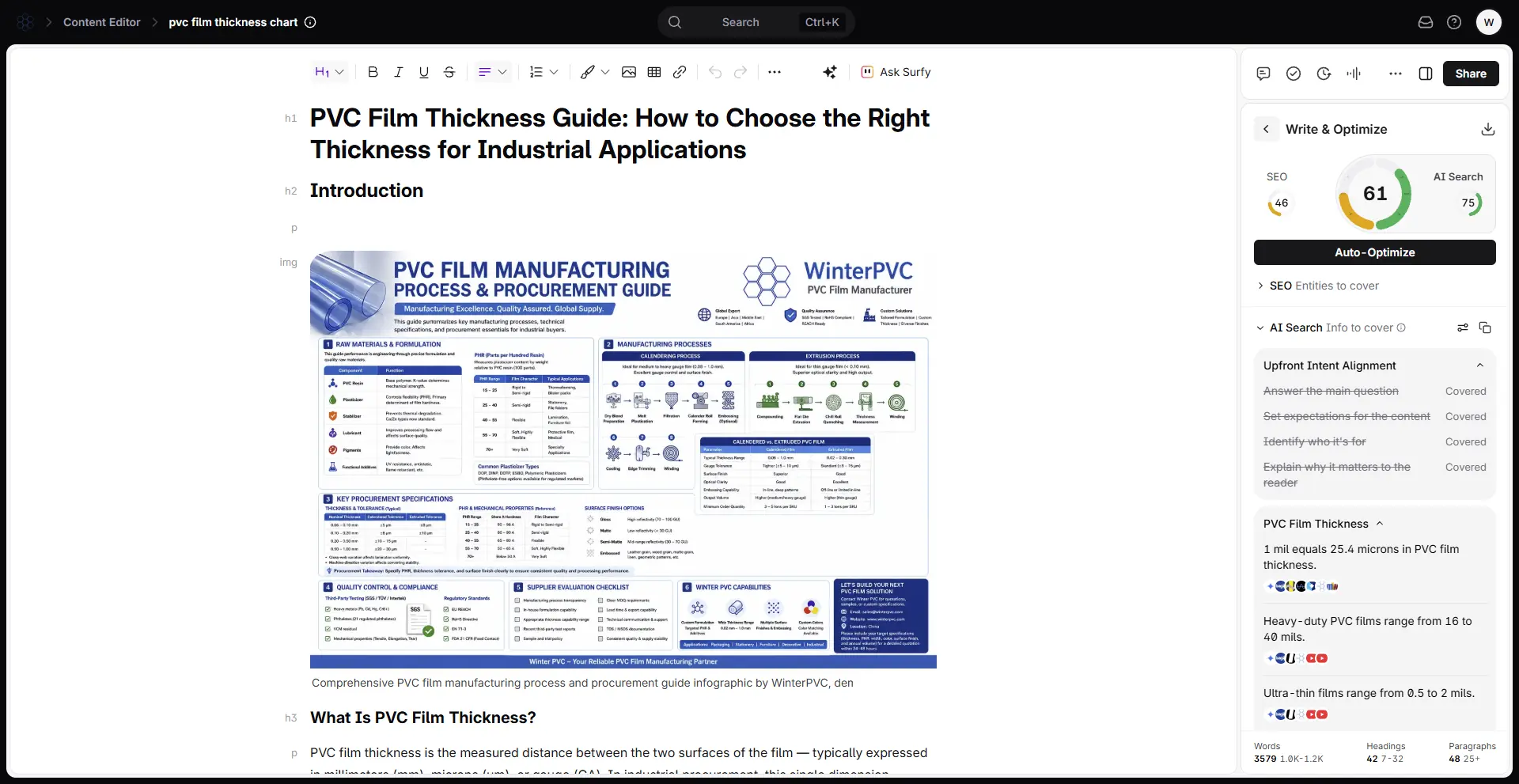
What it does not do: tell me why the page is weak. It gives one combined score, and that’s it. My full Surfer SEO review goes through what that means in practice.
2. Frase — for auditing the whole site. I ran Frase’s site audit and it scored the site 60% across 40 pages, then split its score into EEAT 38%, GEO 85% and SEO 84%. That breakdown was the single most useful thing any tool has told me: my SEO signals were fine and my content was highly extractable for AI, but my authority and experience signals were the actual weakness. Surfer never surfaced that, because it doesn’t try to measure it.
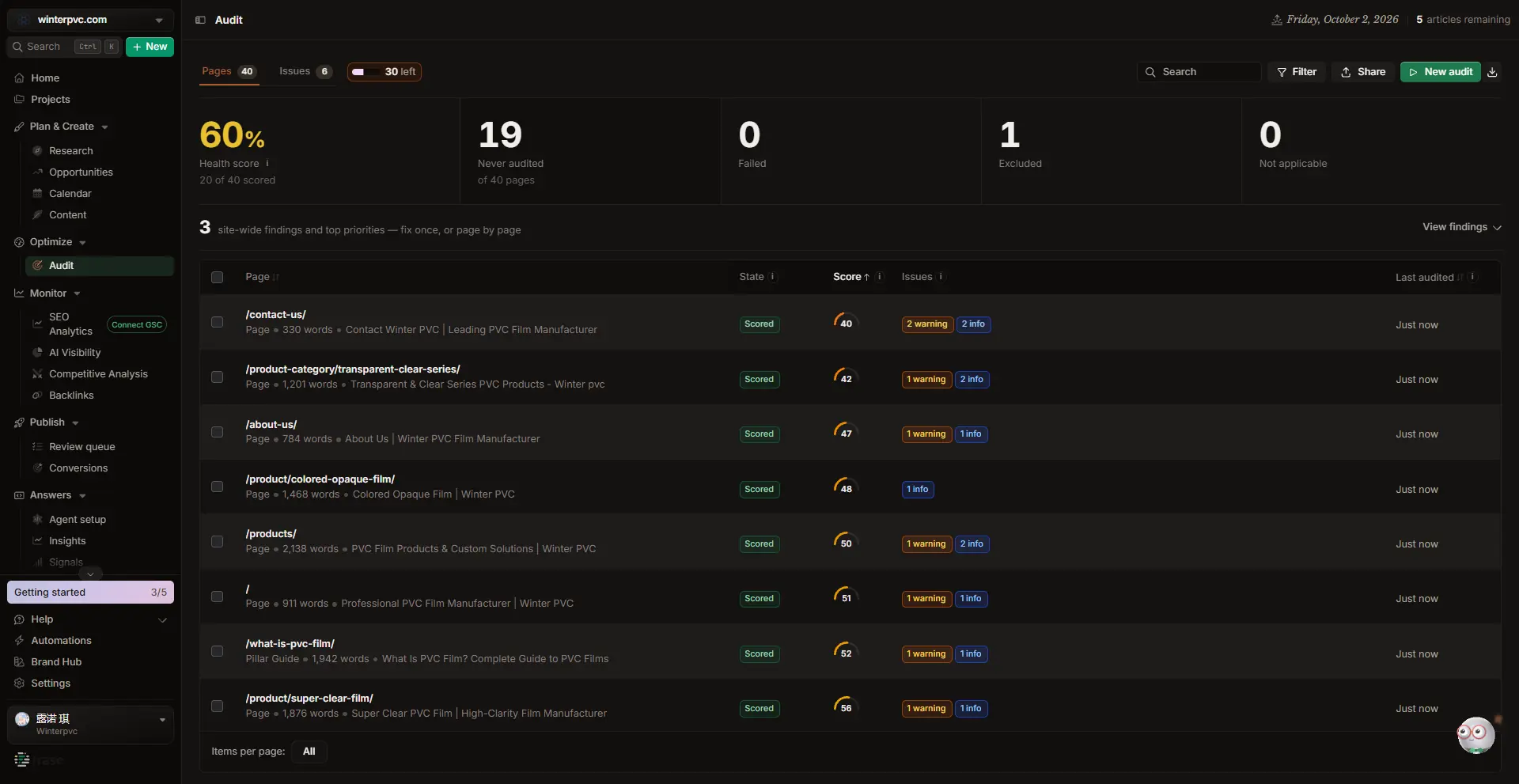
It also found missing alt text on 20 of 20 scored pages. I compared both tools in detail in my Frase review, including the parts where Frase was plainly wrong — like the competitor matching that suggested two dead domains and a steel pipe company.
The split in one line: Surfer optimises a page; Frase audits a site. If you only have budget for one, buy the one that matches your bottleneck.
Why I let both lapse instead of subscribing: neither problem repeats every month at my size. I optimised one page with Surfer and audited the site once with Frase — both were one-off jobs. A subscription starts to make sense when the problem recurs, not when the feature list is impressive.
The best SEO tools for small businesses — my shortlist
If you are looking for the best SEO tools for small businesses, my honest shortlist is short, because a small site does not need much. Most roundups of the best SEO tools for small businesses list twenty options; I can only justify four:
- Search Console — non-negotiable, and free. Set it up before anything else.
- A page-level optimiser (Surfer is the one I’ve used). Worth it when you have one or two pages that must rank.
- A site-level auditor (Frase is the one I’ve used). Worth it when you have many pages and no idea which are weak.
- Free WordPress utilities for the technical basics — Query Monitor, Fix Alt Text.
That’s the whole stack. The most common mistake I see on small sites is buying four tools before fixing the one problem Search Console already told them about.
What I deliberately don’t pay for
Being honest about the other side is more useful than another recommendation list:
- Log-file analysis. On a 40-page site with a few hundred visits a month, server logs are a curiosity, not a decision-making tool.
- Hourly rank tracking. My rankings move on a scale of weeks. Daily tracking would produce anxiety, not action.
- Enterprise competitor intelligence. I can see enough with free tools plus two competitor domains I actually care about.
- A third content optimiser. I already know what two of them say about the same page. A third opinion costs money and adds nothing.
None of this is a criticism of those products. It’s a scale mismatch: they’re built for sites with teams and traffic, and I have neither yet.
What it actually costs me per month
The table below is what I actually spend. I’d rather show it than talk around it — including the fact that the biggest line is hosting, not tools.
| Item | Monthly | Why |
|---|---|---|
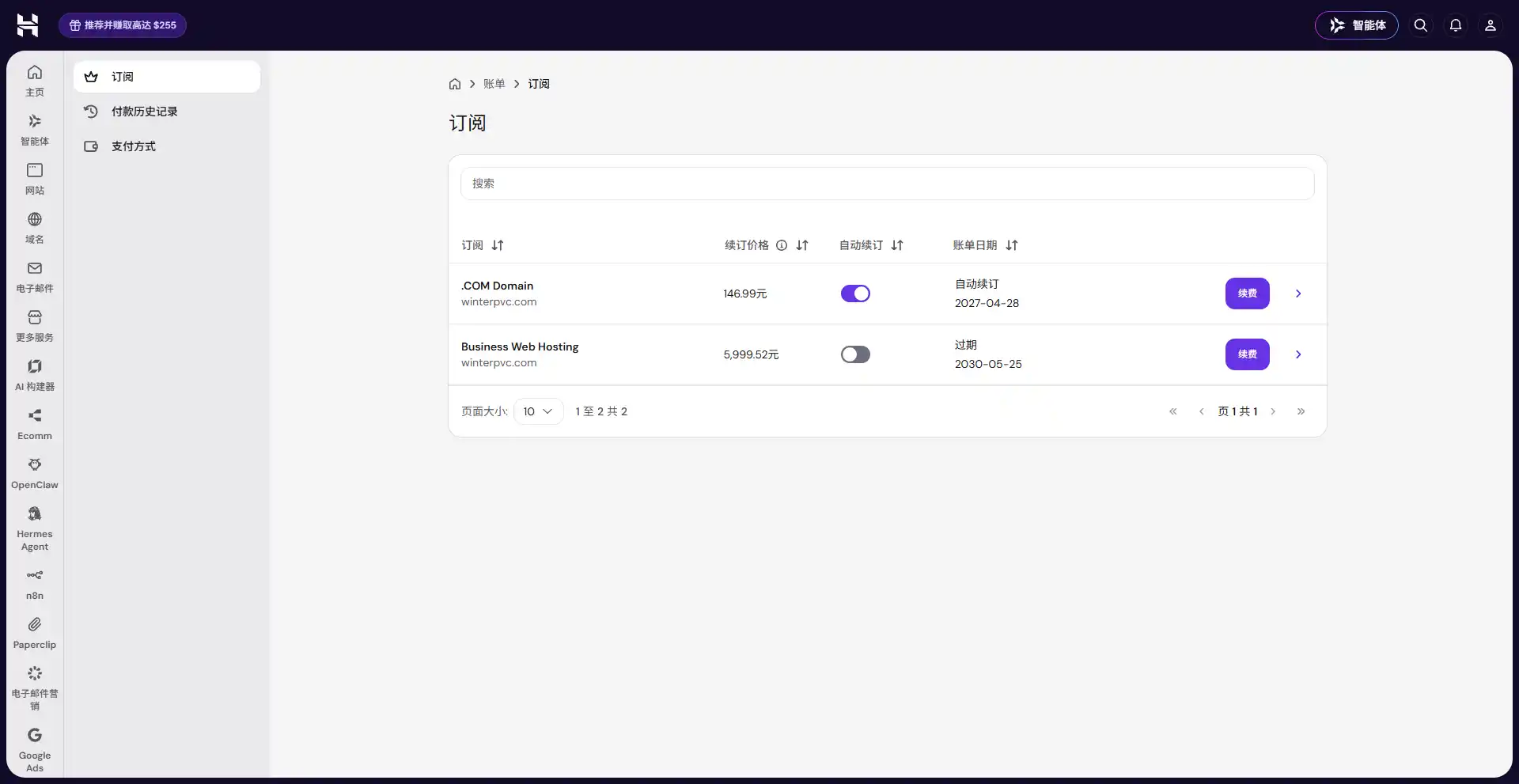
| Hosting + domain | ≈ $17/month | Hostinger Business plan, paid upfront; the .com domain was free for year one |
| Search Console, Rank Math, plugins | $0 | Free tiers are enough at this size |
| SEO tool subscription | $0 — both trials lapsed, not renewed | I subscribe when a problem recurs monthly, not once |
Total: about $17 a month, and none of it is an SEO subscription. Both figures above are the renewal prices shown on my Hostinger billing page, which makes them the pessimistic case rather than the promotional one.
If you subscribe to Surfer, the entry tier is $49/month on yearly billing ($59 month-to-month); Frase’s entry tier is $39/month yearly ($49 monthly). I compare the tiers properly in my Surfer SEO alternatives post — including the trap that Surfer counts documents while Frase counts articles, which makes “cheaper per month” a misleading comparison.
The best SEO tool for B2B: how I would choose one
For the specific case of picking the best SEO tool for a B2B site, the decision comes down to what you are actually stuck on. And if you go looking for a top rated SEO tool for B2B, remember that the rating matters far less than the fit:
- You have one important page and no idea how to compete with the pages above you — get a page-level optimiser. Surfer is the one I’ve used for this.
- You have dozens of pages and can’t tell which are weak — get a site auditor. Frase gave me that view.
- You have neither problem yet — buy nothing. Use Search Console for three months and come back when you have data. That’s what I’d do if I started over.
And if you want to see how this looked before I paid for anything, my nine-day experiment write-up covers the messy part: measuring results when the windows overlap and you didn’t keep a change log.
Frequently Asked Questions
What SEO tools do you actually pay for?
Right now: none. My entire stack is free tools plus one hosting bill. I have used two paid tools – Surfer SEO for about a month on one page, and Frase on a free trial that I let expire – and I would subscribe again if a page-level or site-level problem started blocking me every month. The free layer is Google Search Console, Rank Math, Query Monitor, Fix Alt Text and the Rich Results Test.
Do I need paid SEO tools for a small B2B site?
Not at first. On a site with tens of pages, Search Console answers most of your questions for free: indexation, queries, positions, Core Web Vitals and security. Paid tools only earn their place when you need to compare one page against the current SERP, or audit a whole site for structural weaknesses.
What is the cheapest useful B2B SEO tool stack?
Search Console (free) plus one paid tool, matched to your bottleneck: about $39–49 per month depending on which one. Adding a second paid tool before you’ve fixed the first problem is where budgets usually go wrong.
Is Surfer SEO or Frase better for a B2B site?
They answer different questions. Surfer is better for building one page properly against the current SERP — it gave my page a content score of 61 and a focused entity checklist. Frase is better for auditing a whole site — it scored mine 60% across 40 pages and broke that into EEAT, GEO and SEO. On my page, Frase’s breakdown was the more useful diagnosis.
Are free SEO tools enough for a small site?
For the first few months, yes. Search Console plus free WordPress utilities cover crawlability, indexing, on-page checks and basic technical fixes. What free tools don’t do well is score one page against the live SERP, which is the specific job I pay for.
How much should a small business spend on SEO tools?
My honest answer: one subscription, at the entry tier, until it stops being the bottleneck. That’s roughly $40–50 a month. Anything beyond that should be justified by a problem you can name — not by a feature list.
Conclusion
My whole B2B SEO tools stack is free tools plus a hosting bill, and the subscription comes later – when a problem repeats often enough to be worth it. That is not a budget compromise; it is the only setup where I can tell which change actually did something.
If you want the rest of the series: the first experiment is here, the tool comparison is here, the pricing traps are here, and the checks I run before opening any AI SEO tool are here.